A user asked me about waking up a sleeping monitor when an alert arrives for the Message and Map Clients. I had never thought about that. When my computer plays a sound and my monitor is sleeping, I just reach over and move the mouse to see what was issued by the NWS.
Changes have been made in the 3.0 clients to support this feature. If the Message Client plays a sound, a command will be issued to wake up the monitor. If the Map Client pops up, it will issue a command to wake up the monitor.
Thursday, November 30, 2006


Sunday, November 26, 2006
Weather Message Net Beta 10
I have posted Beta 10 to the website http://www.wxmesg.com/wxbeta
This update includes changes for Weather Message, Weather Message Clients, WxLocal and WxDataSave.
I will try to post a 2.10 release with the updated map component tomorrow.
This update includes changes for Weather Message, Weather Message Clients, WxLocal and WxDataSave.
I will try to post a 2.10 release with the updated map component tomorrow.
USB to Serial Adapters
Not all USB to Serial Adapters are created equal. When I upgraded my computer several years ago, I purchased an IOGear GUC232A. It worked with my Zephyrus receiver, however, every once in a while, the serial port would simply lock up. When this occurred, I had to reboot my computer to get the serial port back working. If I stopped and stop the serial ingest program rapidly, the port would lock up.
I picked up a new MFJ USB to Serial Adapter recently and installed it over the weekend. I have not had a lock up with it yet. The MFJ unit is based on the FTDI chip set.
I picked up a new MFJ USB to Serial Adapter recently and installed it over the weekend. I have not had a lock up with it yet. The MFJ unit is based on the FTDI chip set.
Saturday, November 25, 2006
Short Message by Product Update
The next beta will contain the ability to specify short messages by product. The Short Message menu option has been replaced with Product Specifications.
You can enter TOR to enter a short message to be used by the TOR product. You can also enter TORBMX to have a short message for a specific WFO.
The program will honor the short message setup for a group first, then look for a matching product. If neither are present, it will used the default message.
This has been a commonly requested feature. Due to the amount of work required, it has remained on the pending features list for some time.
You can enter TOR to enter a short message to be used by the TOR product. You can also enter TORBMX to have a short message for a specific WFO.
The program will honor the short message setup for a group first, then look for a matching product. If neither are present, it will used the default message.
This has been a commonly requested feature. Due to the amount of work required, it has remained on the pending features list for some time.
Thursday, November 23, 2006
Colors
As several people have discovered, the version 3.0 software uses a new color scheme. The new colors have 4 components A, R, G and B. A is the alpha channel (transparency), R for red, G for green and B for blue.
I have been asked about convering html colors to a decimal value. Note: You will probably want to use the windows calculator to convert hex values to decimal. Here is an example.
Alice Blue's html color is #F0F8FF hex or 15792383 decimal. In order to convert this color so that is usable in the WxMap ini file, you need to do the following. Take 15792383 and add 4278190080, which is the alpha channel value (#FF000000), then subtract 4294967296 (#100000000). This results in the value -984833. This value can be used in the WxMap.ini file.
Note: The alpha channel's value 255 (#FF) represents no transparency.
The proper representation of this value in hex is FF,F0,F8,FF. This is the ARGB format.
You can convert one component at a time as follows.
FF = 255 * 16777216 = 4278190080
F0 = 240 * 65536 = 15728640
F8 = 248 * 256 = 63488
FF = 255 * 1 = 255
Value = 4293982463
Subtract 4294967296
ARGB = -984833
You can convert from ARGB to the individual componets. It is important to remember that if the number is negative, you first need to add 4294967296 (#100000000). Once this addition has occurred, you can plug that decimal number into the windows calculator and click the Hex button to get each hexadecimal pair.
Note: In windows calculator, click view, then select scientific. This gives you the hex to decimal and decimal to hex conversion options.
I have been asked about convering html colors to a decimal value. Note: You will probably want to use the windows calculator to convert hex values to decimal. Here is an example.
Alice Blue's html color is #F0F8FF hex or 15792383 decimal. In order to convert this color so that is usable in the WxMap ini file, you need to do the following. Take 15792383 and add 4278190080, which is the alpha channel value (#FF000000), then subtract 4294967296 (#100000000). This results in the value -984833. This value can be used in the WxMap.ini file.
Note: The alpha channel's value 255 (#FF) represents no transparency.
The proper representation of this value in hex is FF,F0,F8,FF. This is the ARGB format.
You can convert one component at a time as follows.
FF = 255 * 16777216 = 4278190080
F0 = 240 * 65536 = 15728640
F8 = 248 * 256 = 63488
FF = 255 * 1 = 255
Value = 4293982463
Subtract 4294967296
ARGB = -984833
You can convert from ARGB to the individual componets. It is important to remember that if the number is negative, you first need to add 4294967296 (#100000000). Once this addition has occurred, you can plug that decimal number into the windows calculator and click the Hex button to get each hexadecimal pair.
Note: In windows calculator, click view, then select scientific. This gives you the hex to decimal and decimal to hex conversion options.
Wednesday, November 22, 2006
Weather Message Production Server Conversion
The Weather Message Production Server was upgraded to Weather Message .Net 3.0 today. The conversion worked, however, I did identify a couple of problems that I will fix for the next beta.
I will be watching the server carefully over the next couple of days to make sure the conversion was clean.
- The map ini file did not fully convert.
- There seems to be some problem with TAP paging using a 300 baud modem.
- WxDataSave is reporting a problem with graphic products.
- Some of the WxLoader files did not fully convert.
Overall I am pleased and it appears that my server is using less cpu. The old WxDataSave really took alot of cpu.Update 11/22/06 22:15 - These problems are now resolved.
I will be watching the server carefully over the next couple of days to make sure the conversion was clean.
Sunday, November 19, 2006
Weather Message Net Beta 9
I have posted Beta 9 to the website http://www.wxmesg.com/wxbeta
This update includes changes for Weather Message, Weather Message Clients, WxLocal and WxDataSave.
I went ahead and uploaded it early due to changes needed by some users. I have a couple of additional changes, but they are going to take a little more time to get completed.
Hopefully I will have some productive time over the holidays to get several changes completed.
This is getting us close to releasing 3.0. Since all of the programs have been completed, I will be upgrading my production system - hopefully this week. After it runs for while, I should be ready.
This update includes changes for Weather Message, Weather Message Clients, WxLocal and WxDataSave.
I went ahead and uploaded it early due to changes needed by some users. I have a couple of additional changes, but they are going to take a little more time to get completed.
Hopefully I will have some productive time over the holidays to get several changes completed.
This is getting us close to releasing 3.0. Since all of the programs have been completed, I will be upgrading my production system - hopefully this week. After it runs for while, I should be ready.
Saturday, November 18, 2006
Short Message by Product
I am looking into the ability to specify a different short message by product identifier. I have had a number of request for this capability.
The thought is to replace the current short message menu option with "Product Specification" or "Product Specs". The user would be presented with a list, that would contain a default entry that would apply to all products. Clicking on the default row would allow you to change the current short message info. Adding a new product would allow you to setup a new short message, vtec message, options for that product. This would allow you to have a different "user defined" option for each product.
If this proceeds forward, I am questioning whether there needs to be a short message option on the group.
The program would use the group short message first, if present. Then check for a matching product short message, if one was not found, it would use the default.
The thought is to replace the current short message menu option with "Product Specification" or "Product Specs". The user would be presented with a list, that would contain a default entry that would apply to all products. Clicking on the default row would allow you to change the current short message info. Adding a new product would allow you to setup a new short message, vtec message, options for that product. This would allow you to have a different "user defined" option for each product.
If this proceeds forward, I am questioning whether there needs to be a short message option on the group.
The program would use the group short message first, if present. Then check for a matching product short message, if one was not found, it would use the default.
Radar Image Update
WxRadar now supports the following national products:
National Mosaic
Pacific Northwest Sector
Northern Rockies Sector
Upper Mississippi Valley Sector
Central Great Lakes Sector
Northeast Sector
Southeast Sector
South Mississippi Valley Sector
Southern Plains Sector
Southern Rockies Sector
Pacific Southwest Sector
You must select the state "NA" to see these radar sites.
National Mosaic
Pacific Northwest Sector
Northern Rockies Sector
Upper Mississippi Valley Sector
Central Great Lakes Sector
Northeast Sector
Southeast Sector
South Mississippi Valley Sector
Southern Plains Sector
Southern Rockies Sector
Pacific Southwest Sector
You must select the state "NA" to see these radar sites.
WxDataSave
I have posted the install program for WxDataSave .Net. This is the database archive utility.
Sunday, November 12, 2006
Weather Message Net Beta 8
I have uploaded Beta 8 to the website. This update contains a couple of fixes and updated F1 documentation for all programs.
I also realized that I had not created an install for WxLocal. It can now be downloaded from http://www.wxmesg.com/WxBetaNet/LoBetaNet.htm The install includes integrated documentation.
I will work to get the installer for WxDataSave created this week, along with the associated documentation. I had over looked it also.
The documentation conversion project is coming to a close. I will get everything read and checked for errors. That will allow me to concentrate on changes and additional testing prior to 3.0 release. The documentation had to be completed before the software could be released.
I knew the documentation conversion would take alot of time, but I did not realize how much work had to be done. The old documenation was around 150 pages. The new documentation is around 190.
I also realized that I had not created an install for WxLocal. It can now be downloaded from http://www.wxmesg.com/WxBetaNet/LoBetaNet.htm The install includes integrated documentation.
I will work to get the installer for WxDataSave created this week, along with the associated documentation. I had over looked it also.
The documentation conversion project is coming to a close. I will get everything read and checked for errors. That will allow me to concentrate on changes and additional testing prior to 3.0 release. The documentation had to be completed before the software could be released.
I knew the documentation conversion would take alot of time, but I did not realize how much work had to be done. The old documenation was around 150 pages. The new documentation is around 190.
Saturday, November 04, 2006
HVTEC Progress
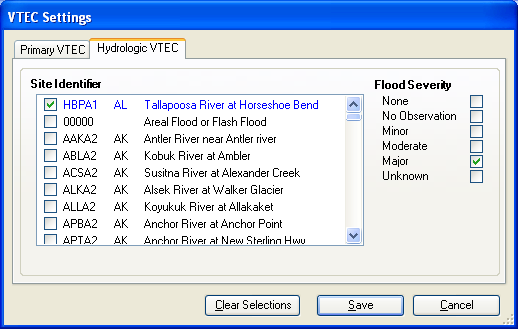
Changes have been made to Weather Message to support HVTEC alarms. The alarm setup screen follows. 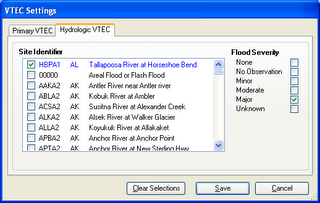
I have not worked out the details on how the short message variables will work. Stay tuned.
I have not worked out the details on how the short message variables will work. Stay tuned.
Thursday, November 02, 2006
Group2Call - Adding Pauses in the Message
You can add pauses to the Group2Call text to speech messages by adding this text:
<SILENCE MSEC="500"/>
This will cause the text to speech engine to pause for 500 milliseconds.
<SILENCE MSEC="500"/>
This will cause the text to speech engine to pause for 500 milliseconds.
Tuesday, October 31, 2006
Don't forget the event viewer
I had a customer report several crashes with Weather Message 3.0. Each time the program crashed, he was asked whether to send debugging information to Microsoft. He tried that a couple of times and asked me if I had received the information. The answer was no. I don't subsribe to that service from Microsoft.
I asked that he snap me a picture of the crash information. After reviewing a couple of those, I could not determine the nature of the problem. That "microsoft box" would not allow him to copy the entire error message. We went back and forth for a couple of weeks to no avail.
I finally asked him to look at the event viewer to see if he could find an entry when the crash occurred. I had forgotten that the CLR (the .net common language runtime) makes entries in the event view for some error conditions. Yes --- he found entries and sent them to me right away.
After looking at the information for 2 minutes, I quickly discovered that the faulting module was mclsp.dll. This dll has nothing to do with Weather Message, but everything to do with McAfee firewalls and tcp/ip. Apparently it has some problem --- the user is now investigating that and promises to give me an update.
All of the Weather Message programs attempt to capture error conditions and report them to the user before shutting down. Most are recorded in a log file, if the program has a log file, or a file with the extension ".log".
In situations where the application is not given the chance to handle the error, remember to look at the event viewer to see if the CLR made an entry. This can make running down an error a lot faster.
I asked that he snap me a picture of the crash information. After reviewing a couple of those, I could not determine the nature of the problem. That "microsoft box" would not allow him to copy the entire error message. We went back and forth for a couple of weeks to no avail.
I finally asked him to look at the event viewer to see if he could find an entry when the crash occurred. I had forgotten that the CLR (the .net common language runtime) makes entries in the event view for some error conditions. Yes --- he found entries and sent them to me right away.
After looking at the information for 2 minutes, I quickly discovered that the faulting module was mclsp.dll. This dll has nothing to do with Weather Message, but everything to do with McAfee firewalls and tcp/ip. Apparently it has some problem --- the user is now investigating that and promises to give me an update.
All of the Weather Message programs attempt to capture error conditions and report them to the user before shutting down. Most are recorded in a log file, if the program has a log file, or a file with the extension ".log".
In situations where the application is not given the chance to handle the error, remember to look at the event viewer to see if the CLR made an entry. This can make running down an error a lot faster.
Sunday, October 29, 2006
Integrated Program Help Update
After discussing the integration of program help with some of the beta users, I am moving ahead in this direction. Considering that the manual would need to be heavily rewritten and updated for version 3.0, the decision was made to move the manual to a windows style help file.
Beta 6 contains windows style help for the Server and Server Setup programs. The F1 key has been enabled on all windows. I can say that the help is more detailed than what you would find in the manual.
The is a big undertaking to say the least. I suspect I will spend the rest of this week and next weekend getting this completed. The current manual is over 150 pages. It will be worth the effort.
I should be able to update this help as I make changes in the software. This will help the beta testers as the notes that I make on the beta page should be reflected in the program help.
The question is whether there will ever be a manual. The answer is yes. I have the ability to print the windows style help as a manual. I will do that after all of the help has been converted.
Beta 6 contains windows style help for the Server and Server Setup programs. The F1 key has been enabled on all windows. I can say that the help is more detailed than what you would find in the manual.
The is a big undertaking to say the least. I suspect I will spend the rest of this week and next weekend getting this completed. The current manual is over 150 pages. It will be worth the effort.
I should be able to update this help as I make changes in the software. This will help the beta testers as the notes that I make on the beta page should be reflected in the program help.
The question is whether there will ever be a manual. The answer is yes. I have the ability to print the windows style help as a manual. I will do that after all of the help has been converted.
Tuesday, October 24, 2006
Integrated Program Help
I am looking at the possibility of integrating Weather Message's manual as a standard windows help file. The manual is now over 150 pages and is becoming more and more of a task to maintain. Breaking the manual down by program function and attaching it to each program's respective help button may make the job easier. The big question is what does a user prefer!
If you have thoughts are comments, drop me a note.

If you have thoughts are comments, drop me a note.

Sunday, October 22, 2006
New FTP Ingest Option
Weather Message 3.0 now has options to automatically ingest the nws ftp files. The first option is to ingest the 3 hour file when the program is first started. The second option is to automatically download the files based on a user selected interval.
The first option to automatically download the 3 hour file when the program starts will help users that do not use the software until a weather event occurs. The second option, just provides a redundant mechanism to download the files.
The option to manually download the ftp files has not changed.
The first option to automatically download the 3 hour file when the program starts will help users that do not use the software until a weather event occurs. The second option, just provides a redundant mechanism to download the files.
The option to manually download the ftp files has not changed.
FTP Ingest Problem
It appears that the emwin archive files on the NWS EMWIN ftp server are no longer being updated. The last update was 9/28/06. The server does contain files with new names that are being updated. The new archives appear to contain both text and graphic products, rather than being separate downloads.
I have sent an email to Santos to inquire about this change. I am updating Weather Message 3.0 with the new file names. I'll update 2.10 after hearing back from him.
The new archives are complete with no missing products. It appears that the files are being created by Weather Message Ingest. The duplicate files contain a numeric sequence. Did I forget to mention that the NWS is using Weather Message Retransmission software at HQ!
I can say that the old archive files were not complete. If two products with the same name were issued during an archive period, only the last file was in the archive. This was not good and basically made those archives incomplete. The new archives, if they stay, will be a welcomed change.
I have sent an email to Santos to inquire about this change. I am updating Weather Message 3.0 with the new file names. I'll update 2.10 after hearing back from him.
The new archives are complete with no missing products. It appears that the files are being created by Weather Message Ingest. The duplicate files contain a numeric sequence. Did I forget to mention that the NWS is using Weather Message Retransmission software at HQ!
I can say that the old archive files were not complete. If two products with the same name were issued during an archive period, only the last file was in the archive. This was not good and basically made those archives incomplete. The new archives, if they stay, will be a welcomed change.
H VTEC Decoding
Weather Message Net now decodes the H VTEC line when present. H VTEC is used in hydrological products. The H VTEC line contains this information; Site Identifier, Flood Severity, Immediate Cause, Flood Record, Flood Beginning Date, Flood Crest Date and Flood Ending Date.
In discussing this capability with a user, I know that the next step will be to add alarm support for Site Identifier and Flood Severity. In addition to alarming, I suspect some users will want short message variables for each of these elements. If you are interested in H VTEC and want to provide some input on how it operates, send me a email.
In discussing this capability with a user, I know that the next step will be to add alarm support for Site Identifier and Flood Severity. In addition to alarming, I suspect some users will want short message variables for each of these elements. If you are interested in H VTEC and want to provide some input on how it operates, send me a email.
Optimization
Weather Message 3.0 is internally different from Weather Message 2.x. The program were practically rewritten for microsoft.net 2005. I have spent countless hours reviewing the code for bottlenecks and ways to increase performance, which reduces CPU utilization.
Changes this weekend have resulted in some optimizations that give a 50% time improvement in some routines. (This resulted in a few milliseconds of improvement) There were also changes that reduced the per message internal memory requirement.
When it seems that I am not turning out alot of new changes, I am still at work on the software. The microsoft.net 2005 environment is new to all programmers. Because of that, I have to double check the code. It has to work, then when it works, I want to determine if there a faster way to get the job done.
A programmer can write code that works, but uses all of your CPU cycles. My goal has always been to write good code that is highly efficient. I guess that goes back to my days of writing code for computers that had 8,000 bytes of memory. Having access to mega-bytes or giga-bytes of memory and giga-hertz cpus is no excuse for poorly written code.
I recently spent 4 hours rewriting the serial ingest data processing routine. The change resulted in the routine being event driven which was supposed to be a good thing. After the changes, the program consumed twice the cpu cycles. I went back to the original code that worked and provided the lowest cpu usage.
Optimization of the Weather Message code will continue for some time as I learn the best ways of accomplishing tasks.
As a side note to optimization, I will start converting the configuration files of other applications to XML. Although there is a small performance penalty for using XML, this standardization is worth the cost.
Changes this weekend have resulted in some optimizations that give a 50% time improvement in some routines. (This resulted in a few milliseconds of improvement) There were also changes that reduced the per message internal memory requirement.
When it seems that I am not turning out alot of new changes, I am still at work on the software. The microsoft.net 2005 environment is new to all programmers. Because of that, I have to double check the code. It has to work, then when it works, I want to determine if there a faster way to get the job done.
A programmer can write code that works, but uses all of your CPU cycles. My goal has always been to write good code that is highly efficient. I guess that goes back to my days of writing code for computers that had 8,000 bytes of memory. Having access to mega-bytes or giga-bytes of memory and giga-hertz cpus is no excuse for poorly written code.
I recently spent 4 hours rewriting the serial ingest data processing routine. The change resulted in the routine being event driven which was supposed to be a good thing. After the changes, the program consumed twice the cpu cycles. I went back to the original code that worked and provided the lowest cpu usage.
Optimization of the Weather Message code will continue for some time as I learn the best ways of accomplishing tasks.
As a side note to optimization, I will start converting the configuration files of other applications to XML. Although there is a small performance penalty for using XML, this standardization is worth the cost.
Subscribe to:
Posts (Atom)


 times.