W

X

Sunday, January 27, 2008

EMWIN Installation

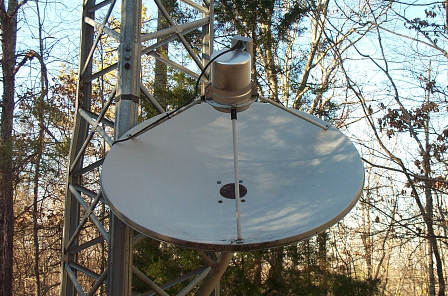
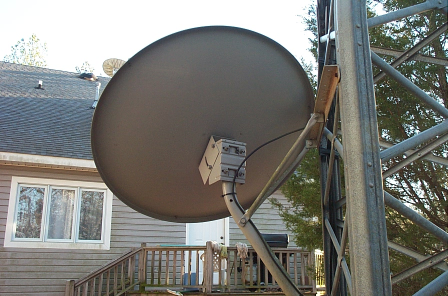
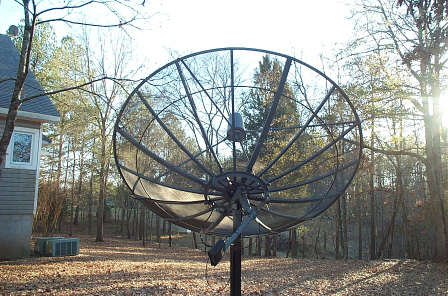
While I was taking pictures, I went ahead and took pictures of the EMWIN dish. This is a Zephyrus system using the WX-13m receiver. The dish is side mounted to my free-standing tower.


NoaaPort Installation

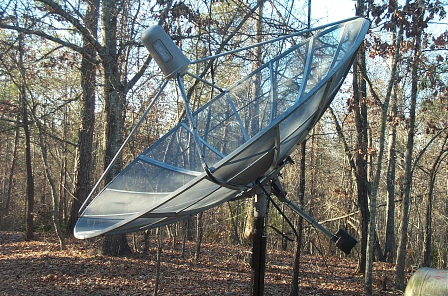
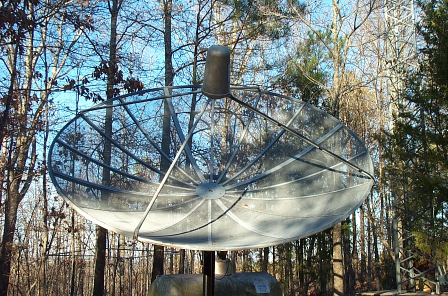
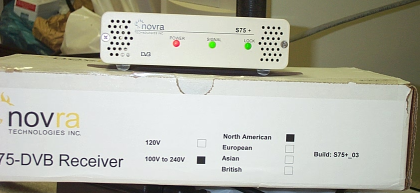
Here are some pictures of my NoaaPort installation. The pictures show a 10 foot dish that I picked up for free. I am using a Norsat 8515 500 Khz. 15° Professional LNB with a Chaparral feedhorn. The receiver is a Novra S75.


Saturday, January 26, 2008

WxPort

I have made several changes to WxPort, the NoaaPort ingest program. It can now ingest all 4 NWS datastreams. I have also identified several problems that have not been discovered by other users.

I have a test program that will decode the gini data (satellite images). I will be refining it further.

I will try to post some images of my installation tomorrow.

Monday, January 21, 2008

Weather Message Beta 5

I am in the process of uploading Weather Message Beta 5. I am also refreshing all of the other applications. No big changes - check the release notes for the details.

NoaaPort

I have been interested in the NoaaPort data stream since I wrote WxPort. I decided to go ahead and build a NoaaPort system.

I spent the last couple of days installing a used 10 foot dish. After the dish was installed and aligned, I connected my new Novra S75 DVB-S receiver. I am now receiving all 4 NoaaPort channels. I can tell you there there is more data than anyone could possibly review.

I will be reviewing the image and radar data to see how I can use it for future upgrades to Weather Message and WxPort.

Monday, December 31, 2007

2007 Year End Comments

It is hard to believe that Weather Message is now six years old. For an application that started out as a paging add-in for other EMWIN applications, it has turned into so much more. I credit the success of Weather Message to you the end users. Your suggestions and ideas have driven my development efforts.

I spent all of 2006 rewriting the Weather Message applications. Users started testing version 3.0 at the end of 2006. It was officially released in March 2007. Versions 3.1 and 3.2 were released this year with a number of major enhancements.

I am still working down my list of change requests. The list has gotten smaller, but there is still alot of work to be completed. Look for more of these in version 3.3.

I thank you for your continued support. My hope for you, your families and the agencies and communities you serve is a great and prosperous New Year.

Monday, December 24, 2007

December Note

December has been a busy month for me personally. I have been extremely busy with my "day job". New responsibilities and other concerns have required my full attention.

With a couple of days off for the holidays, I will be making some additional changes. Look for them sometime Christmas evening. I am off now to make my rounds and visit family.

Merry Christmas to all.

Sunday, December 02, 2007

Windows Vista - UAC

Windows Vista's new UAC (User Account Control) may be redirecting the registry and c:\program files\wxmesgnet access to a virtual directory. I have not received a problem report yet, but it would cause an issue if two different users log into the same computer. They would have independent program settings.

The rerouting of the registry and program files directory is a result of virtualization by the UAC changes for 32 bit applications. Microsoft no longer allows standard users to access c:\program files\(application name) any longer. They has have removed the ability to access HKey_LocalMachine\Software for standard users.

Basically Microsoft does not want developers to store application configuration data in c:\program files\(application name) any longer. The same goes for the registry location HKey_LocalMachine\Software.

Virtulization occurs for applications that do not have an embedded manifest. An embedded manifest identifies the type of access that the application needs. The manifest can request administrator access or invoker access. At the present time Weather Message does not contain an embedded manifest.

With the new VS2008 development environment, I can easily embed the manifest. I am concerned that turning on the manifest will result in users losing their existing settings. I will be testing this further before enabling the manifest.

Sunday, November 25, 2007

Weather Message 3.3 Beta 2 Released

I just posted Weather Message 3.3 Beta 2 on the web. The two big changes are the way that passwords are handled and the addition of multiple state selection. If you run into any issues, please let me know.

Saturday, November 24, 2007

Weather Message Beta 3.3 beta 2

I will be releasing Weather Message 3.3 Beta 2 over the weekend. Here are some of the changes.

1) WxLoader has several new options that effect the short message format. This closes a number of user requests.

2) Weather Message Setup will now allow users to select multiple states for one alarm. This request has been outstanding for some time.

These changes were quite involved and took alot of time.

.Net Framework 3.5 - No support for Windows 2000

The Microsoft .Net Framework version 3.5 does not contain support for Windows 2000. It appears that Microsoft is dropping support for that operating system as they release their new technologies. I already knew that version 3.0 did not include Windows 2000. I had hoped it would be included in 3.5. They are supporting XP, Vista, and Windows 2003.

This makes it difficult on the developers that want to take advantage of the features. The Microsoft developers have given me the ability to support the 2.0 framework using their new development environment. That is a big plus. This allows me to take advantage of the new productivity features.

This however does mean that support for Windows 2000 will end in the near future. It looks like Microsoft's decision is to get developers to encourage their users to purchase their newer operating systems.

I have a windows 2000 laptop that works great. I hate to discard it, but as some one famous said "time waits for no man". I guess I will have to get something newer also.

Wednesday, November 21, 2007

Visual Studio 2008 - Framework 3.5

On Monday, Microsoft announced the release of Visual Studio 2008 along with the Microsoft .Net framework version 3.5. I currently use Visual Studio 2005 as my development environment.

Microsoft says that the move to 2008 should be relatively simple from a developers perspective. The original move from Visual Studio 6 was a year long project. I have read that I should not have to make any changes in the software to take advantage of the new developement environment.

I am looking for the DVD to arrive soon. When it arrives I will be testing this new environment and framework for Weather Message. If everything looks good, I will release the next version using the new environment. This will require users to download and install the 3.5 framework. It should be available from windows update soon --- if you want to get a head start.

Passwords

I have had a number of discussions with users about password security. The next Weather Message beta will contain changes that address these concerns. The passwords that are stored in the setup files and registry will now be obfuscated. Obfuscated basically means that they are not stored in clear text and cannot be read.

I tried to change all of the screens that show passwords so that they will mask the password. If I missed any, please let me know.

The ftp debug file will no longer show a clear text password. If you see any in other debug files, please let me know.

Saturday, November 03, 2007

Files now stored with UTC time suffix

Starting with version 3.3, Weather Message will be storing files in the WxText and WxGraph directories with the UTC time instead of local time. This change will prevent problems when the time changes between standard and daylight savings.

I am still testing these changes. Several programs had to be changed to know that the time is stored as UTC.

TCV Product Change from C coding to Z coding

The Tropical Cyclone Watch/Warning (TCV) product is now being issued using zone (Z) encoding. Weather Message version 2.10, 3.0, 3.1 and 3.2 lists this product as FIPS or county (C) coded.

In order to properly alarm this product, the Weather Message versions listed above need to be reconfigured. To manually reconfigure Weather Message, edit the "WxCtype.dat" file in the c:\program files\WxMesg or c:\program files\WxMesgNet directory. Remove the line that contains TCV.

You can optionally download an updated WxCtype.dat file from the Weather Message additional downloads page at http://www.wxmesg.com/misdownloads.htm. Scroll down to Updated FIPS product file. If you have alarms setup for TCV, you will need to double check them. After this change you will need to reselect "All Counties" or the individual counties based on your requirements.

Apparently when the product moved from experimental to operational, the NWS decided to change the UGC coding.

Tuesday, October 23, 2007

Geographical Warnings

Tom and I have been discussing Geographical Warnings. These are warnings based on your location. Weather Message now has the capability to send emails and pages based on a fixed latitude / longitude falling inside or near a polygon.

A really neat application would be to have your gps equipped phone know when it is getting near or inside a watch or warning. Is that possible? Yes and it is not too difficult.

It would require one of two approaches.

1) Run an application on the smartphone that would send the current gps position to a weather server. The server would then search the active watch and warning products to see if the position is near or inside one of the watch and warnings. The application would then alert the user. I am thinking that it would have to send that position once per minute.

2) Run an application on the smartphone that would receive a SMS/email message that contains the polygon information. The application would then check the current position against the polygon and issue an alert. The information would only need to be sent once. It would be the applications responsibility to keep the active watch / warnings in memory and check once per minute to see if the phone was in a warned area.

With smart devices (phones and pda's) this application could work. Some major players in technology have been talking about this for sometime. They even want to put this in cars...

So can it be done on a Weather Message budget? I believe a low cost server solution is possible. All it would take is a user that wants this capability, a phone that supports Windows Mobile and a calling plan that allowed for unlimited SMS or reasonable internet access.

WxPda - Version 3.0 - Beta 2

I had a chance today to install WxPda on a Pocket Pc 2003 computer. I quickly discovered that there was a problem with vga screens. I have corrected that problem and uploaded a fresh beta.

Monday, October 22, 2007

WxPda - Version 3.0

I have upgraded WxPda to Microsoft's Compact Framework 2.0. This upgrade also adds support for Windows Mobile 5. I am changing the program version to 3.0 to match the current Weather Message Net major release number.

I have run some very limited tests. I do not know if it will install on Pocket PC 2003 or Smart Phones. If you give it a try, please let me know your results.

I switched the display on my windows mobile 5 device to landscape and the software now looks correct. You can now use landscape on a windows mobile 5 without problems.

Sunday, October 14, 2007

Weather Message 3.2 Released

Weather Message V3.2 has been released. You can download the update at
http://www.wxmesg.com/downloadsnet.htm . For information on what has changed in this release, please read the release notes.

There are over 56 changes in this release. Here are some highlights.

Highlights -

* Weather Message Server can now run as a Windows service.

* Support for storm based warnings. You can now alarm by latitude longitude.

* WxMap now supports painting polygons.

* WxMap has all colors located in one tab. You can now select the items that appear in the map legend.

* WxMap supports the NWS Zone and Marine layers. To use this feature you must download the latest map layers.

* See the release notes for a complete list of changes.

Thanks for all of your suggestions, bug reports and assistance with the software. Work will begin on version 3.3.

Suggestions for 3.3

- Multiple state support in one alarm.

- User manager.

WxDataSave, WxLocal and the Retransmission applications have been respectively released along with Weather Message 3.2. If you are using any of these applications, they must be upgraded at the same time you upgrade Weather Message.

Birmingham NWS Weather School

I will be making a one hour presentation on EMWIN and Weather Message at the Birmingham NWS's Weather School October 16, 2007. The Birmingham NWS is a long time supporter of EMWIN.

They have incorporated information about EMWIN into their annual Weather School. Because of this, they will not be holding an EMWIN workshop this year. If you are interested in attending an EMWIN workshop, I suggest you contact your local WCM and ask them to sponsor a class.