Wednesday, March 27, 2013
EMWIN News: GOES 12 End-Of-Life
GOES 12 at 60 degrees is nearing end-of-life. The satellite currently is broadcasting the EMWIN-I legacy data stream. NESDIS has yet to set an exact date for GOES 12 to be removed from service, but it is expected to occur in the fall of 2013. Any remaining legacy users should migrate to EMWIN-N capable systems and use GOES East or West.


Tuesday, March 26, 2013
EMWIN FTP Logon Changes Effective June 10, 2013
The NWS announced
today that they will start requiring a user name and password to retrieve files
from the EMWIN FTP server. Your user name and password will be associated with
your computer's static IP address. In order to download files from the EMWIN
FTP server, you will now need a static IP address.
These changes will require an update to Weather Message. I will make an announcement when the changes are completed.
Here is the text from the Public Information Statement.
These changes will require an update to Weather Message. I will make an announcement when the changes are completed.
Here is the text from the Public Information Statement.
Effective June 10, 2013, EMWIN FTP users must apply for a username, a password and provide the IP addresses of systems that retrieve files from the EMWIN FTP server. This change DOES NOT affect satellite broadcast or ByteBlaster users.
The IP addresses will be used to obtain access to the server.
Users will need to ensure they use a static IP address, one that remains the same and is not assigned dynamically and therefore changes between user sessions. If users are unsure if they have a static IP address or need to have one established, they should contact their Internet provider.
After June 10, users will be required to use their new username and password to continue to retrieve data from the EMWIN FTP server. It is strongly recommended that users transition to their new username and password as soon possible to avoid loss of service after June 10, 2013.
To apply for a username and password or for other questions,
email:
Rob Wagner
EMWIN Team
Office of Operational Systems
robert.wagner@noaa.gov
For the latest information on the EMWIN FTP logon changes, go to:
http://www.nws.noaa.gov/EMWIN/ftp server changes.htm
EMWIN is a low cost satellite weather data broadcast service that provides one of the most resilient methods of receiving NWS weather information. The service includes warnings, forecasts, graphics and imagery. The goal of EMWIN is to provide emergency managers the capability to respond faster to severe weather, tsunamis and other hazards.
More information on the EMWIN service can be found at:
http://www.weather.gov/EMWIN/index.htm
National Service Change Statements are online at:
http://www.weather.gov/os/notif.htm
Friday, November 16, 2012
Windows 8
I have installed the Weather Message Clients on a Windows 8 computer. I am pleased to report that I did not have any trouble running the software.
Users that are accustomed to using the Start button in Windows 7 may be initially lost with Windows 8. When the tiled desktop appeared, I managed to get to the desktop. Once there - "No Start Button". The secret is to move the mouse to the lower left corner of the window. Then a start tile appears. Click on the start tile and you move back to the tiled desktop.
Moving the mouse the to lower right corner of the screen displays options to setup the computer. The options that appear on the tiled start screen are different than the options that appear when you are viewing the desktop. The options that appear on the desktop will lead you to the control panel.
My first impressions: I think this operating system is designed for people with touch screens. The regular desktop looks like Windows 7, less the start button. The tiled desktop, is different.
It appears that we are moving into a new era of windows operating systems. I must now start working on transitioning the Weather Message programs from Windows Forms to XAML so that we can take advantage of some of the new features in Windows 8. That will be a major rewrite of the user interface.
Users that are accustomed to using the Start button in Windows 7 may be initially lost with Windows 8. When the tiled desktop appeared, I managed to get to the desktop. Once there - "No Start Button". The secret is to move the mouse to the lower left corner of the window. Then a start tile appears. Click on the start tile and you move back to the tiled desktop.
Moving the mouse the to lower right corner of the screen displays options to setup the computer. The options that appear on the tiled start screen are different than the options that appear when you are viewing the desktop. The options that appear on the desktop will lead you to the control panel.
My first impressions: I think this operating system is designed for people with touch screens. The regular desktop looks like Windows 7, less the start button. The tiled desktop, is different.
It appears that we are moving into a new era of windows operating systems. I must now start working on transitioning the Weather Message programs from Windows Forms to XAML so that we can take advantage of some of the new features in Windows 8. That will be a major rewrite of the user interface.
Microsoft .Net Framework 4.5
Microsoft has release the Microsoft .Net Framework 4.5. The 4.5 framework is an in-place update to the version 4.0 framework. It includes a number of enhancements that improve the operation of programs developed for the 4.0 framework.
Weather Message uses the 4.0 framework. I recommend that all Weather Message users update their systems with the 4.5 update. You will find the update at http://www.microsoft.com/en-us/download/details.aspx?id=30653.
Weather Message uses the 4.0 framework. I recommend that all Weather Message users update their systems with the 4.5 update. You will find the update at http://www.microsoft.com/en-us/download/details.aspx?id=30653.
Saturday, October 27, 2012
Weather Message 3.9 Updated for Twitter Change
The Weather Message 3.9 installers have been updated with the recent twitter changes. A quick fix had been posted to the Weather Message Yahoo group. The program only updates can be used to update your installation.
Monday, October 15, 2012
Twitter Deprecates Endpoints
Twitter has deprecated their unversioned endpoints. Last week they started removing the endpoints from their servers. Several Weather Message users reported a problem with posting messages to Twitter.
We have a temporary fix available that restores functionality. See the Weather Message Yahoo group for a link to the fix and installation instructions.
We have a temporary fix available that restores functionality. See the Weather Message Yahoo group for a link to the fix and installation instructions.
Sunday, September 23, 2012
Garage Storm Shelter
After the April 2011 storms, FEMA made grants available for storm shelters. I applied for one to be installed in my garage. The grant application was finally approved. Here are some pictures of the installation.


The shelter was installed by Robert Hamlin Construction, bobby@blackdogstormshelters.com. The shelter is manufactured by Steelsafe Shelters, www.steelesafeshelters.com.
Thursday, August 30, 2012
Using SMSMatrix for SMS Messaging
Users that want true SMS delivery can use SMSMatrix for this service. It does require a monthly fee. The following setup can be used without any modifications to Weather Message.


Go to paging setup. Click on paging services and
setup a new service as follows:

(Click on the image to see more detail)
Enter the text exactly as it appears. You will want
to replace xxxxxx with your SMSMatrix user name (email address) and yyyyyy with your
SMSMatrix password.
Save the service.
Now setup a new paging group that will use this
service. Here is a screen shot.

(Click on the image to see more detail)
Now assign this group to an alarm and give it a test.
SMSMatrix does support text to speech capability. If you are interested, let me know and I will post setup information.
Tuesday, August 28, 2012
Weather Message 3.9 Released
Weather Message V3.9 has been released. You can download the update at http://www.weathermessage.com/Downloads/WeatherMessage.aspx. For information on what has changed in this release, please read the release notes.
Note: Version 3.9 requires the Microsoft .Net Framework 4.0. Because of this requirement, version 3.9 will not run on Windows 2000 or older operating systems.
There are over 90 changes in this release. Here are some highlights.
There are over 90 changes in this release. Here are some highlights.
- Several Email and Paging enhancements, including the addition of new short message variables.
- Added support for the Zephyrus WX-14 receiver. The ingest program now supports two TCP/IP receivers.
- The Message Client's main interface has been redesigned. There were over 30 changes to this application.
- The Map now has a toolbar for easy zooming.
- Created a new web application to support adding a link to the original product text in facebook and twitter feeds.
WxDataSave, WxLocal and the Retransmission applications have been respectively released along with Weather Message 3.9. If you are using any of these applications, they must be upgraded at the same time you upgrade Weather Message.
Thanks for all of your suggestions, bug reports and assistance with the software. Work will begin on version 4.0 right away. Watch the beta page for updates.
Suggestions for 4.0
Suggestions for 4.0
- I have over 70 pending feature enhancements.
- Starting moving the software from "windows forms" to "windows presentation foundation".
- If you want to see a new feature, please send us an email.
Note: This release requires the full Microsoft .Net Framework 4.0. The Framework has two editions, Client and Extended. You can use this link to download both editions - http://www.microsoft.com/download/en/details.aspx?id=17851
Note: Facebook and Twitter updates will not work without the Microsoft .Net Framework 4.0 Extended install.
Wednesday, August 15, 2012
New Website
Over the course of the next couple of weeks, the pages at http://www.wxmesg.com will start redirecting to http://www.weathermessage.com. We have been working on the new website for a couple of months. It is not quite complete yet.
As we update the content on the new site, we will redirect the old pages, one by one to the new website. We are trying to move all of the content.
We now have the EMWIN product search working on the new site. You will find it at http://www.weathermessage.com/Support/EMWINProductSearch.aspx This page was broken on the old website after our webserver was upgrade.
If you find missing content, please let us know.
As we update the content on the new site, we will redirect the old pages, one by one to the new website. We are trying to move all of the content.
We now have the EMWIN product search working on the new site. You will find it at http://www.weathermessage.com/Support/EMWINProductSearch.aspx This page was broken on the old website after our webserver was upgrade.
If you find missing content, please let us know.
Sunday, July 15, 2012
Providing full message links in tweets and facebook posts
Several customers have asked about adding full message links in tweets and facebook posts. I am now in the process of developing a web application that will allow for links in the posted messages.
Initial tests look good. It does require a public facing IIS webserver with an associated domain name to process the embedded links.
Here is a sample post I made from my test twitter account. (http://www.twitter.com/kb4mdd)
NWS has issued a Area Forecast Discussion http://a.emwin.net/AFDBMX~1
In this example, I am using the domain name "a.emwin.net" to host the data feed.
Initial tests look good. It does require a public facing IIS webserver with an associated domain name to process the embedded links.
Here is a sample post I made from my test twitter account. (http://www.twitter.com/kb4mdd)
NWS has issued a Area Forecast Discussion http://a.emwin.net/AFDBMX~1
In this example, I am using the domain name "a.emwin.net" to host the data feed.
Monday, May 07, 2012
CAP Ingest
The next release of Weather Message will have the ability to ingest the National Weather Service CAP feed. CAP stands for the Common Alert Protocol. You can learn more about CAP from this wikipedia article.
The NWS publishes an Atom feed for each state that contains a list of active weather products. Each entry contains a link to the actual CAP formated XML. That XML is CAP compliant and contains specific information about the weather product.
At this time, this ingest engine is pull only. It has to poll the NWS servers for new products. In the future, they will be pushing this data and/or CAP compliant messages will appear on the regular NWS data streams.
Why do we need another ingest method? That is a good question. Many government agencies are now requiring software applications to be CAP compliant. This addition will allow Weather Message to be CAP compliant.
The NWS publishes an Atom feed for each state that contains a list of active weather products. Each entry contains a link to the actual CAP formated XML. That XML is CAP compliant and contains specific information about the weather product.
At this time, this ingest engine is pull only. It has to poll the NWS servers for new products. In the future, they will be pushing this data and/or CAP compliant messages will appear on the regular NWS data streams.
Why do we need another ingest method? That is a good question. Many government agencies are now requiring software applications to be CAP compliant. This addition will allow Weather Message to be CAP compliant.
Zephyrus WX-14 now in production
The Zephyrus WX-14 Next Generation EMWIN receiver is now in full production. Zephyrus is now accepting orders. You can contact them at 918-437-3333.
They are in the process of updating their website with information on the WX-14.
They are in the process of updating their website with information on the WX-14.
Monday, March 12, 2012
Thursday, December 29, 2011
The Zephyrus WX-14 EMWIN Receiver
Zephyrus Electronics is getting ready to release their new WX-14 EMWIN Receiver. I understand that they have some of these already installed for testing. This receiver is a hardware based receiver. It does not use a sound card. Users can interface to the receiver using a serial port, usb port, or ethernet connection (TCP/IP).
Here are some images of the receiver.


When Zephyrus is ready for customer orders, I will make another post.
One Weather Message user has one of these and is using the ethernet connection (TCP/IP). The Weather Message EMWIN ingest program supports TCP/IP connections to the receiver using the Software Demodulator ingest option. The Software Demodulator option will connect to the NOAA Software Demodulator or Zephyrus receiver using TCP/IP.
Here are some images of the receiver.


When Zephyrus is ready for customer orders, I will make another post.
One Weather Message user has one of these and is using the ethernet connection (TCP/IP). The Weather Message EMWIN ingest program supports TCP/IP connections to the receiver using the Software Demodulator ingest option. The Software Demodulator option will connect to the NOAA Software Demodulator or Zephyrus receiver using TCP/IP.
Tuesday, November 29, 2011

GOES-15 starts journey to replace GOES-11
GOES-15 has started its journey from storage to 135 degrees West. NWS HQ has confirmed that the satellite is transmitting the new EMWIN signal. Here is a schedule of events:
Transition Timeline:
Transition Timeline:
- August 22, 2011. GOES-15 began executing GOES-West frames (no Rapid (RSO), Super Rapid (SRSO) and the Full Disk (FD) frames) to accommodate advanced user testing of GOES-15 data.
- September 1, 2011 through October 15, 2011 is the GOES-15 Fall eclipse season for 2011.
- October 18, 2011 at 0321 UTC. GOES-15 will begin a westward drift from 89.5 degrees West to 135 degrees West at a rate ~ 0.78 degrees/day.
- December 1, 2011. A GOES-15 drift rate adjustment maneuver will be performed.
- December 6, 2011. As GOES-15 approaches 129 degrees West, the GOES-15 transition to GOES-West will occur. GOES-15 data will flow through GOES-11 communication links, thus, GOES-15 data becomes operational but is received through the GOES-11 downlink. In other words, the GOES-15 GVAR data are relayed through GOES-11. Users pointing to GOES-11 will start receiving GOES-15 data. Ancillary communication services (DCS/LRIT/EMWIN/SAR) will remain on GOES-11. Users do not re-point antennae. At this point GOES-15 data are considered operational, but should significant problems occur, GOES-11 data can be reestablished quickly.
- December 14, 2011. A GOES-15 stop maneuver will be performed. The GOES-11 signal is turned off and GOES-15 data are acquired directly from GOES-15. GOES-15 GVAR data will be relayed through GOES-15. Ancillary communication services (DCS/LRIT/EMWIN/SAR) will switch from GOES-11 to GOES-15.
- December 15, 2011. Pending successful arrival of GOES-15 at 135 degrees West, GOES-11 will perform de-orbit maneuvers, and GOES-11 will be decommissioned.
Thursday, October 13, 2011
GOES West Transition Date Confirmed
The GOES West Transition date has been confirmed. The transition is now scheduled for December 14, 2011. The following information was posted on the EMWIN website.
GOES West
GOES 15 is set to replace GOES 11 (West) on December 14, 2011. All EMWIN users should obtain EMWIN-N capable systems to continue to receive the satellite broadcasts. Legacy EMWIN Equipment must be upgraded.
What GOES West Users need to do
For GOES West (11) users with EMWIN-N capable systems the transition will be very simple, wait for the change to occur and then configure the software demodulator. Then toggle the switch on the intermediate frequency adapter to the “QPSK” setting. Processing of the EMWIN-N broadcast can then begin.
Users that have not upgraded their legacy EMWIN systems still have options. On or before December 14, 2011 legacy users need to re-point to GOES 12 at 60 degrees West. We recommend that these legacy users should try re-pointing to GOES 12 as soon as possible to determine if they will be able to acquire the signal from their location. Legacy users not able to receive the GOES 12 broadcast can continue to receive EMWIN with an internet connection through the EMWIN byteblaster network.
The transition could occur earlier due to premature failure of the GOES 11 satellite. All users need to migrate to EMWIN-N capable systems. Please see the vendor page on the EMWIN website.
GOES 12 is operating at 60 degrees West to help support the Caribbean and South America. The EMWIN-I 9.6 kbps signal was activated on GOES 12 on May 5, 2010 and will remain on until further notice. This service will eventually end, so it is strongly recommended that users transition as soon as possible.
Saturday, October 01, 2011
XMPP Support Added
Weather Message now supports the XMPP protocol. XMPP is implemented as a paging service. If you don't know what XMPP is, here is the information provided by the XMPP Standards Foundation.
This addition allows Weather Message to post alerts to chat groups. The posted messages can be in any of the supported Weather Message formats, short, selected or full.
The Extensible Messaging and Presence Protocol (XMPP) is an open technology for real-time communication, which powers a wide range of applications including instant messaging, presence, multi-party chat, voice and video calls, collaboration, lightweight middleware, content syndication, and generalized routing of XML data.XMPP is used by Google for Google talk. It is also used by the National Weather Service for their NWSChat service. Here is a list of XMPP clients listed on the Google website http://www.google.com/talk/otherclients.html
This addition allows Weather Message to post alerts to chat groups. The posted messages can be in any of the supported Weather Message formats, short, selected or full.
Sunday, September 25, 2011
Message Client Overhaul Part 2
Here is a picture of the latest changes to the message client. These change are in the latest 3.9 beta.


The main window now features a product list. A new request tab appears that works like the existing request window. This consolidates several of the features into the main window.
Friday, September 23, 2011
Weather Message Software LLC
We are now Weather Message Software LLC. Nothing has changed except the structure of the business. I will be posting additional information as we position the company for the future.
Thursday, September 22, 2011
GOES-15 to replace GOES-11 (West) in December 2011
If you are using GOES-West to receive the EMWIN datastream, this is a reminder that the GOES-West transition is planned for December 2011. Based on information presented during the 2011 Satellite Direct Readout Conference, GOES-15 will be taken out of storage before the fall eclipse season for yearly inclination maneuver and imager testing. It will start drifting to 135 degrees west in October 2011.
If you have not upgraded your receiver for the EMWIN-N signal, now is the time to start planning.
If you have not upgraded your receiver for the EMWIN-N signal, now is the time to start planning.
Monday, September 05, 2011
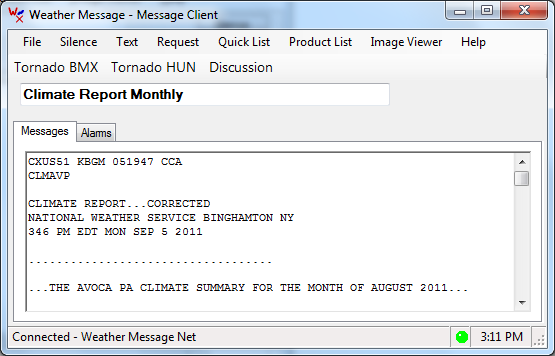
Message Client Overhaul
I have started the process of overhauling the Message Client. The main user interface will be receiving an update to provide more features.
The first change gives users the ability to associate function keys with the Quick List products. The second change allows selected Quick List items to be turned into Quick Buttons. The Quick Buttons appear under the menu.
The following screen demonstrates the change.

The first change gives users the ability to associate function keys with the Quick List products. The second change allows selected Quick List items to be turned into Quick Buttons. The Quick Buttons appear under the menu.
The following screen demonstrates the change.
Saturday, August 27, 2011
Weather Message Byte Blaster Server now on port 2211
On January 30, 2010, I blogged about port number 2211 being assigned to EMWIN. See EMWIN Port 2211 for more information. Today I moved the Weather Message Byte Blaster server to port 2211. There are now a number of servers using this as the standard Byte Blaster port.
I updated the Byte Blaster Server to default to port 2211 for new installs. If you run a Byte Blaster server, you should be able to safely move it to port 2211.
The NWS servers will continue to use port 1000. This will allow users behind firewalls with port 1000 open to continue to operate properly.
Users that had to open port 1000 should consider opening port 2211 also.
I updated the Byte Blaster Server to default to port 2211 for new installs. If you run a Byte Blaster server, you should be able to safely move it to port 2211.
The NWS servers will continue to use port 1000. This will allow users behind firewalls with port 1000 open to continue to operate properly.
Users that had to open port 1000 should consider opening port 2211 also.
Thursday, August 04, 2011
WeatherMessage.net domain
After alot of discussion, we have purchased the WeatherMessage.net domain. This domain will work just like the wxmesg.com domain. Over the years, many people have asked what WxMesg.com means. In order to reduce confusion, we decided to use a domain name that simply identifies the company and our product.
The new domain, although longer, will be easier for potential customers to understand and type. We will start migrating to the new domain over the coming months. The original WxMesg.com domain will remain in place.
The new domain, although longer, will be easier for potential customers to understand and type. We will start migrating to the new domain over the coming months. The original WxMesg.com domain will remain in place.
Monday, July 04, 2011
Weather Message 3.8 Released
Weather Message V3.8 has been released. You can download the update at http://www.wxmesg.com/downloadsnet.htm. For information on what has changed in this release, please read the release notes.
Note: Version 3.8 requires the Microsoft.Net Framework 3.5. Because of this requirement, version 3.8 will not run on Windows 2000 or older operating systems.
There are over 50 changes in this release. Here are some highlights.
There are over 50 changes in this release. Here are some highlights.
- Will now use the Microsoft Framework 4.0, if installed.
- Updated support for Facebook and Twitter.
- New short message variables.
- Support for FTPS and SFTP.
- WxMap now supports a dynamic map legend.
- WxMap now has an option to use the NWS product colors.
- WxMap now has an option to zoom to a county when reading a text product.
- Retired the Active-X version of WxMap. WxMapNet replaces WxMap.
- WxMap will now run as a 64 bit application.
Thanks for all of your suggestions, bug reports and assistance with the software. Work will begin on version 3.9 right away. Watch the beta page for updates.
Suggestions for 3.9
Suggestions for 3.9
- I have over 50 pending feature enhancements. If you want to see a new feature, please send us an email.
WxDataSave, WxLocal and the Retransmission applications have been respectively released along with Weather Message 3.8. If you are using any of these applications, they must be upgraded at the same time you upgrade Weather Message.
Note: I recommend that users download and install the full Microsoft.Net Framework 4.0. The Framework has two editions, Client and Extended. You can use this link to download both editions - http://www.microsoft.com/download/en/details.aspx?id=17851
Note: I have a large number of pending requests. I will begin to address these over the coming months.
Note: I am still working on a new Weather Message website. The revised website will ultimately allow users to login and obtain their registration codes.
Saturday, July 02, 2011
NOAA to take over the Weather Wire Service
One of my users sent me a letter he received from CSC. CSC provides the Weather Wire service. Here is an excerpt from the letter.
Weather Message users who use this service need to follow this closely.
Subject: Discontinue of Weather Wire Service
Dear Weather Wire Subscriber:
Our records indicate you receive the Commercial Weather Wire Service via C-Band or Internet. CSC has provided these services for the past twenty (20) plus years to our customers. It is with great regret CSC needs to inform you that NOAA Weather Service has decided not to continue the Weather Wire Program with CSC. As of now we do know that the Weather Wire Service will be provided directly from NOAA.
At this time, CSC doesn't have any particulars or contact information to disclose. CSC will continue to provide the Weather Wire Service until first quarter of 2012. As soon as we find out more information, we will inform all of our Commercial Weather Wire Customers whom the POC is and how to receive the information on the Service NOAA will provide.
We are sorry for any inconvenience this may cause our customers.
Saturday, May 21, 2011
Weather Message 3.8 Beta 9
I have posted Weather Message version 3.8 beta 9 to the beta website. It contains a fix that makes Twitter authorization work. Twitter had changed their website and it had stopped working. It also includes a couple of enhancements.
Thursday, May 19, 2011
New Email Server
My office now has a new in-house email server. I have moved Weather Message's email to that server. If you experience a problem sending me email, please post a message to the Weather Message Yahoo group.
Wednesday, May 11, 2011
Novra S300 Firmware Update
Novra has released a firmware update for the S300 receiver. The release notes list the following change:
S300 V2R7 Release NotesThe firmware update can be found at this link http://www.novra.com/Website/Novra_Support.html Scroll down to the bottom of the page.
- includes firmware modifications to improve NOAA data reception.
Friday, April 29, 2011
Dadeville Tornado
Many of you have been sending me emails over the past couple of days. I wanted to respond to the group regarding the Dadeville Alabama tornado. I am glad to report that me and my family are ok. I did not have any damage from the tornado it was 7 miles south of my house.
My sister's home in Dadeville was destroyed. The only room left standing was the closet that they took shelter. I was trying to call her when I saw that the tornado was headed in their direction. One minute later she called me to tell me that they were trapped in the house and needed help. I immediately called 911.
I could not get to the house by road, so I walked a half a mile through the woods. All of the trees were blown over so it took some time. After searching the house, I found they were at a neighbor's house and ok.
As many of you know, I serve as a volunteer fire fighter and first responder in my local fire department. I went out to check on the other homes. As I reached the next house, one of their neighbors called out that they had someone injured.
I spent the next 45 minutes with an elderly lady who passed due to her injuries. The neighbor found her under a wall. Her house was completely missing. She had gone to what I think was the bathroom. In this case, the "safe" place was not safe.
In EMS we talk about the golden hour. Considering that I had to drive 15 minutes to get on the scene. Then walk through the woods to check on my family. Then start helping others, the golden hour had lapsed. The Dadeville Fire personnel got to me 5 minutes before she expired.
My sister, brother-in-law and nephew are staying with me right now. We spent yesterday salvaging the remains of their home. We saved a lot of pictures and personal items. Work will continue today.
I appreciate your emails, prayers and support. As weather enthusiasts and professionals, we must be diligent in our work to notify people of severe weather.


My sister's home in Dadeville was destroyed. The only room left standing was the closet that they took shelter. I was trying to call her when I saw that the tornado was headed in their direction. One minute later she called me to tell me that they were trapped in the house and needed help. I immediately called 911.
I could not get to the house by road, so I walked a half a mile through the woods. All of the trees were blown over so it took some time. After searching the house, I found they were at a neighbor's house and ok.
As many of you know, I serve as a volunteer fire fighter and first responder in my local fire department. I went out to check on the other homes. As I reached the next house, one of their neighbors called out that they had someone injured.
I spent the next 45 minutes with an elderly lady who passed due to her injuries. The neighbor found her under a wall. Her house was completely missing. She had gone to what I think was the bathroom. In this case, the "safe" place was not safe.
In EMS we talk about the golden hour. Considering that I had to drive 15 minutes to get on the scene. Then walk through the woods to check on my family. Then start helping others, the golden hour had lapsed. The Dadeville Fire personnel got to me 5 minutes before she expired.
My sister, brother-in-law and nephew are staying with me right now. We spent yesterday salvaging the remains of their home. We saved a lot of pictures and personal items. Work will continue today.
I appreciate your emails, prayers and support. As weather enthusiasts and professionals, we must be diligent in our work to notify people of severe weather.


Friday, April 08, 2011
Novra S300 Arrives
It seems like déjà vu. Back in January I blogged about my new S200 receiver which turned out to be the wrong receiver. I received my new Novra S300, the right receiver, and installed it today. It is working fine with the current NOAAPort signal. I will see how it performs with the new NOAAPort signal in April.
Sunday, March 27, 2011
Hail Storm
I spend most of my time writing software and watching weather in other parts of the country. Here is a photo of some hail that fell at my home on Saturday.


Wednesday, February 02, 2011
Weather Message Siren Controller Featured on WBRC Fox 6 News
The Weather Message Siren Controller was featured Tuesday February 1st and Wednesday February 2nd on WBRC Fox 6 News, Birmingham, Alabama. This was a great plug for our new software application.
Here are the links to the video.
WBRC Siren Activation Segment Tuesday Night WBRC Siren Activation Video Link
WBRC Siren Activation Segment Wednesday Night WBRC Siren Activation Video Link
Here are the links to the video.
WBRC Siren Activation Segment Tuesday Night WBRC Siren Activation Video Link
WBRC Siren Activation Segment Wednesday Night WBRC Siren Activation Video Link
Wednesday, January 19, 2011
NOAAPort - Novra S200 is the wrong receiver
After purchasing the S200 receiver and installing it here, I have now learned that this is the wrong receiver. What I really need is the S300 receiver, which not currently available. Apparently NOAA wanted to use VCM (variable coding modulation). The S200 receiver does not support this capability. Novra will releasing the S300 sometime between now and April. I understand that the cost of the S300 is around $699.00. There is a discount for current Novra S75 and S200 users.
Due to this situation, NOAA is delaying the DVB-S transition by 45 days. Here is the text of the latest message.
Due to this situation, NOAA is delaying the DVB-S transition by 45 days. Here is the text of the latest message.
WHAT - SBN/NOAAPORT EXPANSION AND HARDWARE UPGRADE DATE - JANUARY 19 2011
NOTICE - 002 PLANNED IMPLEMENTATION DATE - MAY 18 2011
---------------------------------------
UPDATE OF NOTICE 001 TO IDENTIFY RECEIVER SELECTED FOR USE BY THE NWS AND DELAY OF THE PLANNED IMPLEMENTATION DATE
---------------------------------------
THE AWIPS PROGRAM OFFICE IS CONTINUING WITH ITS PLANS TO EXPAND THE BANDWIDTH OF THE AWIPS SATELLITE BROADCAST NETWORK SBN/NOAAPORT FEED FROM 10.24 MBPS TO ABOUT 30 MBPS IN MAY 2011.
AS PART OF THIS EXPANSION, THE SBN/NOAAPORT SIGNAL WILL BE TRANSITIONED FROM THE CURRENT DVB-S STANDARD TO A MORE EFFICIENT DVB-S2 STANDARD.
TODAY, THE NWS AWIPS PROGRAM AGREED TO A DELAY OF 45 DAYS TO ALLOW MORE TIME FOR THE NOAAPORT COMMUNITY TO PREPARE FOR THE TRANSITION.
THE AWIPS PROGRAM HAS SELECTED A DVB-S2 RECEIVER FOR THE SBN/NOAAPORT EXPANSION PROJECT. WE WILL BE IMPLEMENTING A SINGLE DATA STREAM THAT WILL REQUIRE VARIABLE CODING MODULATION -VCM- OVER MULTI-PROTOCOL ENCAPSULATION -MPE- WHICH IS SUPPORTED BY OUR SELECTED RECEIVER.
WE UNDERSTAND THAT ONE OR MORE OTHER MODELS OF DVB-S2 RECEIVERS MAY ALSO BE SUITABLE. THE RECEIVER SPECIFICATIONS CAN BE FOUND ON THE NOAAPORT WEB SITE.
TECHNICAL SPECIFICATIONS FOR THIS PROJECT ARE BEING FINALIZED AND WILL BE MADE AVAILABLE VIA THE NOAAPORT WEB PAGE AS THEY ARE COMPLETED.
IN PREPARATION FOR THE TRANSITION, THE NWS WILL BE PROVIDING A 30 DAY WINDOW STARTING APRIL 18 2011 UNTIL MAY 17 2011 OF DUAL ILLUMINATION WITH BOTH THE -DVB S- AND -DVB S2- STANDARDS TO ALLOW AWIPS SITES AND NOAAPORT CUSTOMERS TIME TO FINALIZE THEIR TRANSITION.
Sunday, January 02, 2011
Novra S200 Arrives
I received my new Novra S200 and installed it today. It is working fine with the current NOAAPort signal. I will see how it performs with the new NOAAPort signal in March.
Saturday, December 18, 2010
NOAAPort Signal Changes March 2011
In March 2011, the NOAAPort signal will change from DVB-S to DVB-S2. That means if you are using the Novra S75 receiver, you will need a new receiver. The Novra S200 will work with both DVB-S and DVB-S2.

This change will increase the data rate from 10.24Mbps to about 30Mbps. There will be a 30 day window between March 5, 2011 and April 3, 2011 when both signals will be present. After April 3, 2010, the DBV-S signal will be discontinued.
You can read more from this data management notice.
If you use NOAAPort, you need to plan on purchasing a new receiver. Novra is offering a discount to existing S75 owners.

This change will increase the data rate from 10.24Mbps to about 30Mbps. There will be a 30 day window between March 5, 2011 and April 3, 2011 when both signals will be present. After April 3, 2010, the DBV-S signal will be discontinued.
You can read more from this data management notice.
If you use NOAAPort, you need to plan on purchasing a new receiver. Novra is offering a discount to existing S75 owners.
NWS Map Colors and Priorities
You will find a list of the colors used on the NWS web warning maps here:
http://www.nws.noaa.gov/wwamap-prd/wwacolortab.php?x=1
and
http://www.nws.noaa.gov/wwamap-prd/faq.php
The priorities for the colors can be found here:
http://www.weather.gov/om/guide/Section6.pdf
http://www.nws.noaa.gov/wwamap-prd/wwacolortab.php?x=1
and
http://www.nws.noaa.gov/wwamap-prd/faq.php
The priorities for the colors can be found here:
http://www.weather.gov/om/guide/Section6.pdf
Tuesday, December 07, 2010
NOAAPort Update
Here is the latest information announced in ADMNCF.
ADMNCFAll NOAAPort users should switch back to 1193.5 before December 8th 1600Z.
Subject: AWIPS SBN Status Update
On Sunday December 5th at approximately 2100Z, the AWIPS NCF moved all AWIPS NWS sites to a temporary frequency due to SBN interference problems that were found on the original AWIPS SBN frequency.
During the past 24 hours, the NCF has worked with the satellite provider, GLOBECOM, to ensure all interference problems experienced throughout the weekend have been corrected. Today between 1930Z and 2000Z, GLOBECOMM will perform intrusive testing on the original AWIPS SBN signal.
All AWIPS offices are still currently using the temporary AWIPS SBN frequency and will not be impacted by the intrusive testing that is taking place. External NOAAPORT users that are currently using the original AWIPS SBN frequency may experience brief data outages while testing is taking place.
Tomorrow, December 8th between 1400Z and 1500Z, the NCF will re-point all NWS offices back to the original AWIPS SBN frequency. The switch back to the original AWIPS SBN frequqncy will be done remotely by the NCF and sites should not see any downtime as a result of the switch back to the original frequency. Once all sites have been re-pointed back to the original AWIPS SBN frequency, another admin message will be sent.
On December 8th at 1600Z, the temporary AWIPS SBN frequency that was established will be terminated. Any external NOAAPORT users pointed to the temporary AWIPS SBN frequency will need to switch back to the original AWIPS frequency before 1600Z on December 8th.
Thank you for your continued patience while these issues are being resolved.
Sunday, December 05, 2010
NOAAPort Receive Problems
There have been significant receive problems with the NOAAPort signal today. After lunch my Novra receiver was not able to lock onto the signal at 1193.5 mhz. Around 8:00 someone announced that the frequency may have changed. Our friend Dave, KG4YZY, found out that the new frequency was 1138.5. After updating the Novra with the new frequency, it is now locked and receiving data.
I don't know if this is a permanent change or only temporary until the original problem is resolved.
I don't know if this is a permanent change or only temporary until the original problem is resolved.
Tuesday, November 30, 2010
First Polygon Siren Activation occurred today in Autauga County
The first polygon siren activation, using WxSiren Controller, occurred today in Autauga County. Here is a copy of the automatic siren activation message.
NOXX02 KWXM 301515I will be posting a news release later today.
SIRWXM
WEATHER MESSAGE SIREN CONTROLLER
ACTIVATION MESSAGE
915 AM CST TUE NOV 30 2010
SIREN ACTIVATION TYPE: AUTOMATIC
ACTIVATION CLASS : Tornado
PRODUCT : Tornado Warning
SIRENS:
401
407
408
410
$$
Saturday, November 27, 2010
Windows not visible after screen resolution changes
Several users have run into situations where some of the Weather Message windows are not visible after changing the screen resolution. I have added code to the programs to check and see if the program's window is on one of the connected monitors. If the window is off screen, it will be moved back on the screen.
Right now this code works immediately with child windows. If the program's primary window is missing, the user will have to stop and restart the program. When it restarts, it will be visible.
In the past, users were required to edit the registry or an ini to get a missing window back. This will save the user and me alot of time.
Right now this code works immediately with child windows. If the program's primary window is missing, the user will have to stop and restart the program. When it restarts, it will be visible.
In the past, users were required to edit the registry or an ini to get a missing window back. This will save the user and me alot of time.
Sunday, November 21, 2010
Weather Message 3.8 Beta 1
I am in the process of uploading Weather Message 3.8 Beta 1. This release of Weather Message will using the Microsoft.Net Framework 4.0 if it is installed on the computer. I recommend that all users install Microsoft.Net Framework version 4. You can install the 4.0 framework from this link.
Note: If you install the version 4 framework, make sure you install the full version 4 framework. Microsoft made a version 4 client profile that does not contain all of the version 4 assemblies.
All of the programs are compiled against Microsoft.Net framework Version 3.5. Most likely they will be compiled against the version 4 framework before 3.8 is released. The current beta will allow us to evaluate the programs using the version 4 framework. Initial tests did not reveal any problems. The version 4 framework contains a number of enhancements that may improve program speed and/or operation.
Several of the programs in this release of Weather Message will not work on Windows 2000. I do not recommend installing Version 3.8 on a Windows 2000 computer.
Note: If you install the version 4 framework, make sure you install the full version 4 framework. Microsoft made a version 4 client profile that does not contain all of the version 4 assemblies.
All of the programs are compiled against Microsoft.Net framework Version 3.5. Most likely they will be compiled against the version 4 framework before 3.8 is released. The current beta will allow us to evaluate the programs using the version 4 framework. Initial tests did not reveal any problems. The version 4 framework contains a number of enhancements that may improve program speed and/or operation.
Several of the programs in this release of Weather Message will not work on Windows 2000. I do not recommend installing Version 3.8 on a Windows 2000 computer.
Saturday, November 20, 2010
NWS Products and Services Reference Guidebook
The NWS Products and Services Reference Guidebook can be found at this address http://www.weather.gov/om/guide/ This guidebook contains some good general information about the NWS products and services.
WxMap - Speed Increases
After researching an issue in WxMap, I ran some performance tests to see if using a county's database identifier was faster than finding the county by center point. The current operation, in general, is faster than database access. If the county appears in the database first, the database method is somewhat faster.
I did some research on my mapping component vendor's website and discovered that using 'rtree' indexing would make the spacial operations faster. I thought I had already enabled that option. Upon checking I did find that I enabled that option on each layer.
When I read through several posts, I discovered that rtree indexing should be enabled after adding the layer to the viewer. I gave that a try and was blown away. The speed increase is remarkable. It is well over 100% faster than the old operation. Users will definately notice the difference if they are alarming the entire United States.
This operation does create an additional file in the Map directory for each map layer. You will notice a new file for each layer with the extension 'rtree'. The files are not really large and are created the first time the map program is loaded.
I did some research on my mapping component vendor's website and discovered that using 'rtree' indexing would make the spacial operations faster. I thought I had already enabled that option. Upon checking I did find that I enabled that option on each layer.
When I read through several posts, I discovered that rtree indexing should be enabled after adding the layer to the viewer. I gave that a try and was blown away. The speed increase is remarkable. It is well over 100% faster than the old operation. Users will definately notice the difference if they are alarming the entire United States.
This operation does create an additional file in the Map directory for each map layer. You will notice a new file for each layer with the extension 'rtree'. The files are not really large and are created the first time the map program is loaded.
Sunday, November 14, 2010
WxMap now supports a dynamic map legend
WxMap now supports a dynamic map legend. The map can continue to be static or two versions of dynamic. Dynamic 1 only displays products that are checked with the show in legend option. Dynamic 2 displays all active products. Here are examples of the legend.


These two map legends are dynamic. The second map legend displays 'No Active Products'.
Wednesday, November 10, 2010
WxLoader and the PRO-Lite TruColor II
WxLoader can now upload text to the PRO-LITE TruColor II scrolling led sign. Here is a link for information on this sign - http://www.pro-lite.com/indoor-singleline-plm20.htm
Using WxLoader, the sign can read "A Tornado Warning as been issued for the following counties in Alabama, Tallapoosa, expiring at 9:00." (It flashes the word Tornado in red.)

Using WxLoader, the sign can read "A Tornado Warning as been issued for the following counties in Alabama, Tallapoosa, expiring at 9:00." (It flashes the word Tornado in red.)

This is a picture of the Pro-Lite PL-M2014RV6.
Sunday, November 07, 2010
Weather Message 3.7 Released
Weather Message V3.7 has been released. You can download the update at http://www.wxmesg.com/downloadsnet.htm. For information on what has changed in this release, please read the release notes.
There are over 80 changes in this release. Here are some highlights.
Suggestions for 3.8
Note: I have a large number of pending requests. I will begin to address these over the coming months.
Note: I am working on a new Weather Message website. I hope to place the new website on-line by the end of this month. This change will ultimately allow users to login and obtain their registration codes. It is based on a popular content management system and will allow me to quickly update the website.
There are over 80 changes in this release. Here are some highlights.
- Updated support for Facebook and Twitter.
- User defined products.
- Updated map zones (You will need to download the map update).
- WxMap can now embed an image in a saved map image.
- WxLoader supports the Pro-Lite LED sign.
- See the release notes for a complete list of changes.
Suggestions for 3.8
- WxMap add a dynamic legend
Note: I have a large number of pending requests. I will begin to address these over the coming months.
Note: I am working on a new Weather Message website. I hope to place the new website on-line by the end of this month. This change will ultimately allow users to login and obtain their registration codes. It is based on a popular content management system and will allow me to quickly update the website.
Friday, October 22, 2010
2011 Satellite Direct Readout Conference
The 2011 Satellite Direct Readout Conference will be held April 4-8, 2011 in Miama Florida. For more information visit http://directreadout.noaa.gov/miami11/
The conference will provide information on:
● International Cooperation:
The conference will provide information on:
● International Cooperation:
- Global Earth Observation System of Systems (GEOSS)
- WMO, EUMETSAT, NOAA/NESDIS
- Satellite Providers and Users from the Americas
- Frequency Management
- APT, LRPT
- HRPT, AHRPT
- LRD, HRD
- Argos DCS
- POES
- MetOp
- EOS
- NPP
- JPSS
- Polar Field Terminals
- GVAR, GRB
- GOES DCS
- LRIT, HRIT
- EMWIN
- GOES-13, 14, 15, and R/S
- MSG
- MTSAT, etc.
- Geostationary Field Terminals
Sunday, October 17, 2010
WxLoader - Interfaced to the Pro-Lite Scrolling Led Sign
After 5 months, I have gotten back around to testing my new Pro-Lite II scrolling led sign. After I learned how to program the unit, I change WxLoader to support sending text to the Led Sign. It works great. I am still working with the colors so that I can make watch and warnings look different.
This is a picture of the Pro-Lite PL-M2014RV6.
Sunday, September 26, 2010
WxMap - Adding a logo to the saved map image
The next release of WxMap will allow you to insert a user defined logo in the saved map image. This allows you to personalize the image that you use on websites. The Map Save tab allows you to specify the location on the map. The logo must be saved in the same directory as WxMap.exe or WxMapNet.exe, generally c:\Program Files\WxMesgNet, with the name WxMapLogo.png.
If you create the logo with tranparency the map will show through the logo. I created a test logo that will go out with the next beta. Here is what it looks like this:

If you create the logo with tranparency the map will show through the logo. I created a test logo that will go out with the next beta. Here is what it looks like this:
I used Paint.Net to create the image and make the background semi-transparent.
Tuesday, September 07, 2010
EMWIN Success Stories
I am collecting user testimonials on how EMWIN has been used to "save the day". If you use EMWIN to protect citizens, save life, and property, I would like to hear your story.
With your permission, I will list your testimonial on www.emwin.net for others to read. We need to let others know the value of EMWIN.
You can email your testimonials to me or post them here on the Weather Message Yahoo Group. If you do not want your name or agency included with your testimonial, please let me know. I will respect your wishes.
With your permission, I will list your testimonial on www.emwin.net for others to read. We need to let others know the value of EMWIN.
You can email your testimonials to me or post them here on the Weather Message Yahoo Group. If you do not want your name or agency included with your testimonial, please let me know. I will respect your wishes.
Monday, September 06, 2010
Weather Message Support for Windows 2000 will end soon
Weather Message will no longer support Windows 2000 after version 3.7 is released. Microsoft has dropped support for Windows 2000 in the Microsoft .Net Framework version 4.0. I am planning on moving the software to the .Net Framework 4.0 version with the 3.8 beta.
Here are the system requirements for Microsoft .Net Framework 4.0.
Supported Operating Systems:
Here are the system requirements for Microsoft .Net Framework 4.0.
Supported Operating Systems:
- Windows XP SP3
- Windows Server 2003 SP2
- Windows Vista SP1 or later
- Windows Server 2008 (not supported on Server Core Role)
- Windows 7
- Windows Server 2008 R2 (not supported on Server Core Role)
- x86
- x64
- ia64 (some features are not supported on ia64 for example, WPF)
- Recommended Minimum: Pentium 1 GHz or higher with 512 MB RAM or more
- Minimum disk space: x86 – 850 MB, x64 – 2 GB
Thursday, September 02, 2010
Twitter and Facebook Support in Weather Message
Weather Message Beta 7 includes the new Twitter authentication changes. This release also introduces Facebook support. The F1 help's supplement section contains example setups for Twitter and Facebook.
Note: After discussing the facebook implementation with one user, I discovered that you can only post to your personal page. If you manage multiple facebook "pages", the current implementation will not post to those pages. I have been testing changes that will allow you to post to any page that you administer. Those will be available in the next beta release.Update: Beta 8 now includes support for multiple facebook pages.
Sunday, August 22, 2010
Twitter Changes
Twitter is changing their authentication mechanism from "Basic Authentication" to "OAuth". Twitter provides this description: "OAuth is an authentication protocol that allows users to approve application to act on their behalf without sharing their password."
Twitter will be disabling Basic Authentication at the end of this month. For Weather Message to continue sending tweets, I will need to make some involved changes.
I have moved this item up on my priority list and will try to add this capability to Weather Message.
Twitter will be disabling Basic Authentication at the end of this month. For Weather Message to continue sending tweets, I will need to make some involved changes.
I have moved this item up on my priority list and will try to add this capability to Weather Message.
Sunday, August 01, 2010
WxLocal - Speaking the local weather conditions
WxLocal is receiving the ability to speak the local weather conditions. The program can also write out the speech to a wave file. It sounds good with the Windows 7 text to speech processor.
I sure would be nice if WxLocal would send that wave file to Weather Message so it could upload it to a website and/or send it on to the clients to play.
The ability to play wave files in the Message Client would be nice addition.
I sure would be nice if WxLocal would send that wave file to Weather Message so it could upload it to a website and/or send it on to the clients to play.
The ability to play wave files in the Message Client would be nice addition.
Monday, July 12, 2010
Sending Multiple Emails
Weather Message's email routines send email sequentially using a background worker thread. When an alarm matches a received product, a task is created for each email group associated with the alarm. These tasks are added to the email queue for processing.
The email processor will generally work through the queue in short order. If the email group has a large number of email addresses, it does take some time to send each email address to the smtp server. While all of that is taking place the other email tasks are waiting.
I have completed the code to create a pool of threads. This pool could be used to spawn multiple threads that will take a task from the email queue and start sending it to the smtp server. The question for now is whether this will make the overall sending faster. If the smtp server is throttled per connection, having multiple connections could make sending emails faster.
I ran into a situation with a SNPP server that was slow per connection. In this case, using multiple threads could have made that faster.
Now that the code is complete, I will be running some tests to see how this will work. If the smtp server allows for multiple connects from one user, we might be able to deliver emails faster. For users that only have a few groups, this would not have any affect. For users that have bunches of email groups that are activated often, this may make delivery faster.
Note: If the limiting factor is the internet pipe speed, there is nothing that we can do to make it faster.
I will report further as testing starts later this week.
The email processor will generally work through the queue in short order. If the email group has a large number of email addresses, it does take some time to send each email address to the smtp server. While all of that is taking place the other email tasks are waiting.
I have completed the code to create a pool of threads. This pool could be used to spawn multiple threads that will take a task from the email queue and start sending it to the smtp server. The question for now is whether this will make the overall sending faster. If the smtp server is throttled per connection, having multiple connections could make sending emails faster.
I ran into a situation with a SNPP server that was slow per connection. In this case, using multiple threads could have made that faster.
Now that the code is complete, I will be running some tests to see how this will work. If the smtp server allows for multiple connects from one user, we might be able to deliver emails faster. For users that only have a few groups, this would not have any affect. For users that have bunches of email groups that are activated often, this may make delivery faster.
Note: If the limiting factor is the internet pipe speed, there is nothing that we can do to make it faster.
I will report further as testing starts later this week.
Saturday, July 10, 2010
Siren Controller - Activation Notice
The Weather Message Siren Controller now has the ability to send email notification of siren activations. Previously, you would email the actual activation product. Now the program can generate activation notificates whether automatic or manual. The Siren Controller sends activation notices to Weather Message Server for processing like normal NWS products.
Here is a example manual activation to cancel the sirens:
Here is a example manual activation to cancel the sirens:
NOXX02 KWXM 052011This gives the agency feedback on the sirens and groups that were selected for activation.
SIRWXM
WEATHER MESSAGE SIREN CONTROLLER
ACTIVATION MESSAGE
311 PM CDT MON JUL 5 2010
SIREN ACTIVATION TYPE: MANUAL
ACTIVATION CLASS : Cancel
GROUPS:
1
2
SIRENS:
801
803
$$
Thursday, July 08, 2010
National Weather Service Survey
The National Weather Service is asking users to complete a survey. In this survey you will have the option to selecting EMWIN or NOAAPort as your data source. I recommend that you take the opportunity to give the NWS feedback on your ingest method and their services and products.
The NWS is undertaking research on how satisfied you are with our products and services and would appreciate your feedback. The purpose of this research is to help the NWS improve its services. The survey will take approximately 15 minutes to complete and need not be finished all at once. We also encourage you to take a moment and complete one or more of the optional sections focused on Marine, Aviation, and Hazardous Weather.
The Survey is at the following link: https://svy.cfigroup.com/cgi-bin/qwebcorporate.dll?idx=3XRBCG
Sunday, July 04, 2010
Backlog of files to be processed
A couple of users have reported a large backlog of files to be processed in their received files directory. Under normal circumstances, this should not occur. The processing of files depends on the number of alarms, number of connected clients, speed of the files being received, load on the computer and the speed of the computer itself.
I have not seen this problem myself, however, I knew that the ingesting routine in Weather Message Server was ready for a make over. I spend some time over a couple of days to rewrite the queue processing and ingest routines. These changes will help with the backlog of files.
I moved the file processing to an independent thread. I moved the ingest directory read operation to another independent thread. The ingest processing routine will now read all files in the directory at one time and queue them for the processing routine. The processing routine will then process them back-to-back without any internal delay. The previous routine had some delay between each file.
I downloaded and processed the 3 hour EMWIN ftp archive. This archive contains over 2400 files. The server processed them in about 2 seconds. The performance was definately improved.
I have to admit that I have a new 64bit Windows 7 computer with an i7 processor. That cpu contains 4 cores with hyper-threading. The i7 appears in the performance monitor as 8 cpu's.
A word of caution is always in order when creating additional threads. Some think that the more treads you create the faster the processing. That may not be the case for a single core computer. Each thread has to share time on that one cpu. You start to see the benefits of multiple threads when you have mulitple cores.
The changes will definately improve the program's processing speed, regardless of the number of cpu's.
I have not seen this problem myself, however, I knew that the ingesting routine in Weather Message Server was ready for a make over. I spend some time over a couple of days to rewrite the queue processing and ingest routines. These changes will help with the backlog of files.
I moved the file processing to an independent thread. I moved the ingest directory read operation to another independent thread. The ingest processing routine will now read all files in the directory at one time and queue them for the processing routine. The processing routine will then process them back-to-back without any internal delay. The previous routine had some delay between each file.
I downloaded and processed the 3 hour EMWIN ftp archive. This archive contains over 2400 files. The server processed them in about 2 seconds. The performance was definately improved.
I have to admit that I have a new 64bit Windows 7 computer with an i7 processor. That cpu contains 4 cores with hyper-threading. The i7 appears in the performance monitor as 8 cpu's.
A word of caution is always in order when creating additional threads. Some think that the more treads you create the faster the processing. That may not be the case for a single core computer. Each thread has to share time on that one cpu. You start to see the benefits of multiple threads when you have mulitple cores.
The changes will definately improve the program's processing speed, regardless of the number of cpu's.
Monday, June 14, 2010
User Defined Product File
The next beta release of Weather Message will add a user defined Product file. In the current release, users that want to change the descriptions of products manually change Product.dat. If they have user defined products, they update this file with their specific information.
The Weather Message Program Update installer asks the user if they want to install a revised Product.dat. If this question is answered Yes, the installer overwrites the user's Product.dat. In most cases that is not a problem. For those users that are manually maintaining their Product.dat, it is a big problem. The user can always restore the Product.dat file from the backup folder. They however will not get the updated product file.
In the next beta, users that want to modify the product.dat file should update ProductUser.dat instead. All additions and changes will be added or overwrite those in Product.dat. This will allow users to easily add and change products without losing the ability to receive an updated Product.dat file.
This capability will allow me to easily define user specific products for the siren controller application. I will not have to worry that the next update will wipe out my settings.
Thanks for the suggestion Todd.
The Weather Message Program Update installer asks the user if they want to install a revised Product.dat. If this question is answered Yes, the installer overwrites the user's Product.dat. In most cases that is not a problem. For those users that are manually maintaining their Product.dat, it is a big problem. The user can always restore the Product.dat file from the backup folder. They however will not get the updated product file.
In the next beta, users that want to modify the product.dat file should update ProductUser.dat instead. All additions and changes will be added or overwrite those in Product.dat. This will allow users to easily add and change products without losing the ability to receive an updated Product.dat file.
This capability will allow me to easily define user specific products for the siren controller application. I will not have to worry that the next update will wipe out my settings.
Thanks for the suggestion Todd.
Tuesday, June 08, 2010
Senate, House, Noaa, FCC Contacts
Regarding FCC ET Docket No. 10-123: If you do not know your senator or representative's contact information, you can use the following links.
Representative
https://writerep.house.gov/writerep/welcome.shtml
Senator
http://www.senate.gov/general/contact_information/senators_cfm.cfm
Noaa Administrator
Dr. Jane Lubchenco
Under Secretary of Commerce for Oceans and Atmosphere and NOAA Administrator
National Oceanic and Atmospheric Administration
1401 Constitution Avenue, NW
Room 5128
Washington, DC 20230
jane.lubchenco@noaa.gov
National Weather Service Administrator
Dr. Jack Hayes
Assistant Administrator for Weather Services and Director, National Weather Service
National Weather Service
1325 East West Highway
Silver Spring, MD 20910
jack.hayes@noaa.gov
Department of Commerce Secretary
Secretary Gary Locke
United States Department of Commerce
1401 Constitution Ave., NW
Washington, DC 20230
FCC Filing
http://fjallfoss.fcc.gov/ecfs/
Representative
https://writerep.house.gov/writerep/welcome.shtml
Senator
http://www.senate.gov/general/contact_information/senators_cfm.cfm
Noaa Administrator
Dr. Jane Lubchenco
Under Secretary of Commerce for Oceans and Atmosphere and NOAA Administrator
National Oceanic and Atmospheric Administration
1401 Constitution Avenue, NW
Room 5128
Washington, DC 20230
jane.lubchenco@noaa.gov
National Weather Service Administrator
Dr. Jack Hayes
Assistant Administrator for Weather Services and Director, National Weather Service
National Weather Service
1325 East West Highway
Silver Spring, MD 20910
jack.hayes@noaa.gov
Department of Commerce Secretary
Secretary Gary Locke
United States Department of Commerce
1401 Constitution Ave., NW
Washington, DC 20230
FCC Filing
http://fjallfoss.fcc.gov/ecfs/
EMWIN Satellite Transmission Threatened
On June 4, 2010 the FCC Office of Engineering and Technology "Requests Information on use of 1675 – 1710 MHz Band", ET Docket No. 10-123. They are requesting information on the current users of this frequency spectrum. The EMWIN Satellite data stream uses 1690.725 Mhz and 1692.7 Mhz.
This release seeks to reallocate this frequency spectrum for "broad band" internet. This action would completely destroy EMWIN and LRIT services. Users have until June 28, 2010 to comment on this request. See FCC Release for more information.
I plan on posting a reply and writing to NOAA and my congressmen. Now is the time for action - all EMWIN users, both satellite and internet based, should object to any reallocation.
I will be updating the blog on this as I learn more.
This release seeks to reallocate this frequency spectrum for "broad band" internet. This action would completely destroy EMWIN and LRIT services. Users have until June 28, 2010 to comment on this request. See FCC Release for more information.
I plan on posting a reply and writing to NOAA and my congressmen. Now is the time for action - all EMWIN users, both satellite and internet based, should object to any reallocation.
I will be updating the blog on this as I learn more.
Saturday, June 05, 2010
Support for WinFax Pro retired in 3.7 release
Support for WinFax Pro will be removed from Weather Message version 3.7. WinFax Pro is no longer being sold by Symantec. According to wikipedia, "Symantec discontinued sales and support of WinFax PRO on June 30, 2006."
Users that need support for WinFax Pro can continue to use version 3.6.
Users that need support for WinFax Pro can continue to use version 3.6.
AT&T Natural Voices on 64 bit Windows 7
It took some time to figure out how to get the AT&T Natural Voices to work on Windows 7 64 bit. Apparently the control panel applet for selecting the default voice only works with 64 bit voices (Anna).
In order to change the 32 voices, you have to run:
%windir%\SysWOW64\speech\SpeechUX\sapi.cpl
This is the 32 bit control panel applet. I need to keep reminding myself to look at the 32 bit control panels when I cannot get something to work.
In order to change the 32 voices, you have to run:
%windir%\SysWOW64\speech\SpeechUX\sapi.cpl
This is the 32 bit control panel applet. I need to keep reminding myself to look at the 32 bit control panels when I cannot get something to work.
Dell T1500
I am in the process of changing out my old Dell 8400 3.4ghz Windows XP system with a new Dell T1500 i7 2.8 ghz Windows 7 64bit system. I already have spent about 6 hours reloading all of the software. I am still not finished.
There are some software applications that I have not been able to get to run on Windows 7 64 bit. For the most part everything else seems to work.
I will say that this is a nice computer.
There are some software applications that I have not been able to get to run on Windows 7 64 bit. For the most part everything else seems to work.
I will say that this is a nice computer.
Monday, May 31, 2010
Get control over the Message Box position
Alot of the Weather Message programs display message boxes to tell the user that they entered something wrong or to ask a Yes or No question. The built-in message box appears centered in the screen. You cannot center it over the calling form without a bunch of win32 calls.
I took several hours this morning to write a new message box class. This message box works like the old one and has two new features. It can be centered over the calling form and it now has the ability to automatically close after a programmed number of seconds.
I will be working to change the existing message box calls to this new class. Users will not have to chase after the message box when this change is completed.
I took several hours this morning to write a new message box class. This message box works like the old one and has two new features. It can be centered over the calling form and it now has the ability to automatically close after a programmed number of seconds.
I will be working to change the existing message box calls to this new class. Users will not have to chase after the message box when this change is completed.
Saturday, May 22, 2010
EMWIN Software Demodulator
Several users have reported problems with installing the NWS EMWIN Software Demodulator on Windows 7 computers. Those problems are related with User Account Control (UAC). In most cases turning off UAC allowed the software to install properly.
I had a user attempt to install the EMWIN Software Demodulator on a Windows 7 64 bit system. The NWS installer kept reporting that Data1.cab was corrupted. Right now I don't know why it reported that file as corrupted.
In order to get around this problem, I created a new installer for the EMWIN Software Demodulator. The new installer corrects a number of problems associated with Windows 7 (and I suspect Vista). The new installer does not require the user to unzip the installer to a directory, then run setup.exe. It also defaults the demodulator to the EMWIN-N signal (19200 speed).
For Windows 7 users, with UAC enabled, the EMWIN Control panel would not start or stop the Data Source or Demodulator services. This happend because the control panel applet was not running with elevated privileges. The new installer creates the menu option with the options necessary to launch the control panel with elevated privileges. (WxEmwin should start it properly.)
I went ahead and included the Weather Message Software Demodulator extentions. These extensions allow the EMWIN Software Demodulator to send status message to WxEmwin so that it can display operational information about the EMWIN Software Demodulator.
The NWS EMWIN Software Demodulator is provided free by the National Weather Service. The repackaged installer is available on the Weather Message website.
I had a user attempt to install the EMWIN Software Demodulator on a Windows 7 64 bit system. The NWS installer kept reporting that Data1.cab was corrupted. Right now I don't know why it reported that file as corrupted.
In order to get around this problem, I created a new installer for the EMWIN Software Demodulator. The new installer corrects a number of problems associated with Windows 7 (and I suspect Vista). The new installer does not require the user to unzip the installer to a directory, then run setup.exe. It also defaults the demodulator to the EMWIN-N signal (19200 speed).
For Windows 7 users, with UAC enabled, the EMWIN Control panel would not start or stop the Data Source or Demodulator services. This happend because the control panel applet was not running with elevated privileges. The new installer creates the menu option with the options necessary to launch the control panel with elevated privileges. (WxEmwin should start it properly.)
I went ahead and included the Weather Message Software Demodulator extentions. These extensions allow the EMWIN Software Demodulator to send status message to WxEmwin so that it can display operational information about the EMWIN Software Demodulator.
The NWS EMWIN Software Demodulator is provided free by the National Weather Service. The repackaged installer is available on the Weather Message website.
Friday, May 07, 2010
Weather Message 3.6 Released
Weather Message V3.6 has been released. You can download the update at http://www.wxmesg.com/downloadsnet.htm. For information on what has changed in this release, please read the release notes.
There are over 80 changes in this release. Here are some highlights.
Suggestions for 3.7
Note: I have a number of pending requests. I will begin to address these over the coming months.
There are over 80 changes in this release. Here are some highlights.
- Email subsystem now supports secure connections.
- VTEC settings will now automatically populate based on the alarmed product.
- The Message and Map clients can now automatically locate Weather Message Server on the network.
- Support for posting to Twitter and Facebook.
- Cell phone product email address lookup.
- See the release notes for a complete list of changes.
Suggestions for 3.7
- Release Weather Message Web Based User Manager
- Add support for scrolling LED signs.
Note: I have a number of pending requests. I will begin to address these over the coming months.
Thursday, May 06, 2010
GOES 12 - drifting to 60 degrees - now transmitting
The GOES 12 satellite is now drifting to 60 degrees. The drift is about .5 degrees per day. As of yesterday, the satellite is back transmitting 9600 baud EMWIN data.
For those of you that do not have a 19,200 receive system and cannot see the west coast satellite, you should be able to reposition to receive the GOES 12 data stream. The satellite will continue drifting until it arrives at 60 degrees around May 21.
I have not tried to receive the signal yet, but will over the weekend. My dish, due to mounting location, cannot be positioned to the west coast satellite.
For those of you that do not have a 19,200 receive system and cannot see the west coast satellite, you should be able to reposition to receive the GOES 12 data stream. The satellite will continue drifting until it arrives at 60 degrees around May 21.
I have not tried to receive the signal yet, but will over the weekend. My dish, due to mounting location, cannot be positioned to the west coast satellite.
Wednesday, May 05, 2010
New Feature ??? Scrolling LED Signs
One of my customers has a scrolling LED sign. While talking to the customer, I mentioned that I was interested in seeing Weather Message control an LED sign. One thing led to another and I ordered me one today for testing.
This may be a good job for WxLoader. I will know more when my unit arrives from California sometime next week.
This is a picture of the Pro-Lite PL-M2014RV6.
This may be a good job for WxLoader. I will know more when my unit arrives from California sometime next week.
Sunday, May 02, 2010
Microsoft Releases the .Net Framework Version 4
Microsoft has released the .Net Framework Version 4. The framework was released with the Visual Studio 2010 development environment. I will be upgrading my development environment at some point in the very new future.
I recommend that users go ahead and download the new framework at their convenience. This will save you time when I release a software version that requires the version 4 framework. You may also get some enhancements from the new framework. You can download the latest version from this link Framework 4.
I recommend that users go ahead and download the new framework at their convenience. This will save you time when I release a software version that requires the version 4 framework. You may also get some enhancements from the new framework. You can download the latest version from this link Framework 4.
Thursday, April 29, 2010
Testing the new EMWIN Internet Feed
My EMWIN byte blaster server is participating in a test of the new EMWIN Internet Feed. It has been serving the new data stream for 18 hours now. Everything looks good with no problems encountered.
Each connected client should consume about 19kb of bandwidth. Some clients (ingest programs) can received compressed packets which reduces the bandwidth requirements. Right now with 40 clients connected, the average bandwidth used is around 510kb. That averages out to 13kb per connected client.
I have been submitting routine reports to the EMWIN Team. I hope they find the test successful and begin moving all servers to the new EMWIN feed.
Each connected client should consume about 19kb of bandwidth. Some clients (ingest programs) can received compressed packets which reduces the bandwidth requirements. Right now with 40 clients connected, the average bandwidth used is around 510kb. That averages out to 13kb per connected client.
I have been submitting routine reports to the EMWIN Team. I hope they find the test successful and begin moving all servers to the new EMWIN feed.
Monday, April 26, 2010
GOES-12 (East) has transitioned to GOES-13 (East)
At 15:35 UTC, the GOES-12 EMWIN feed transitioned to GOES-13. GOES-13 is now transmitting EMWIN data at 19200 baud using QPSK modulation.
This was a big undertaking that has been planned for many years. Thanks goes to all the people involved. A special thanks to the EMWIN Team at NWS HQ who have been kind enough to answer my numerious inquiries.
This was a big undertaking that has been planned for many years. Thanks goes to all the people involved. A special thanks to the EMWIN Team at NWS HQ who have been kind enough to answer my numerious inquiries.
Saturday, April 24, 2010
Converting Werner Labs 3 foot dish to 6 foot
Tom Moore sent me some pictures showing his conversion of a Werner Labs 3 foot dish to his 6 foot dish. He said it increased the signal strength and reduced his error rate.
Here is a picture of the original Werner dish.


Here is a picture of the original Werner dish.

Tom removed the antenna and moved it to the 6 foot dish. Here is a picture of it installed on the big dish.

Here is a close up of the antenna mount.

Friday, April 23, 2010
Using Weather Message to update your Facebook status
Weather Message 3.6 Beta C allows users to update their Facebook status. To send status updates to Facebook, you will need do do the following. (Make sure you have version 3.6 Beta C installed)
- Go to Facebook and click on Mobile at the bottom of the page.
- Look for Upload via Email. You need your upload email address. (I had to click on an option at the top of the page that opened a window with the email address. My next visit to the mobile page showed the email address on the main page.)
- Setup a Facebook email group.
- Set the Style for this group to Short.
- Set the Subject Style to Full.
- In the Subject Override line enter $Message$ (this causes the message to appear in the subject line)
- Enter your Facebook upload email address in the email address box.
- Save the Facebook group.
- Associate this group with the alarms that you want sent to Facebook.
Wednesday, April 07, 2010
GOES East Transition still scheduled for April 26
The NWS issued a Public Information Statement today reminding EMWIN users of the pending GOES East satellite transition. Here is an excerpt from the PNS.
THE NATIONAL ENVIRONMENTAL SATELLITE DATA AND INFORMATION SERVICE RECENTLY SET THE DATE FOR GOES 13 SATELLITE TO REPLACE GOES 12 /EAST/ SATELLITE AS ON OR ABOUT APRIL 26 2010. DUE TO CHANGES IN THE SATELLITE CONFIGURATION THAT PROVIDE THE EMERGENCY MANAGERS WEATHER INFORMATION NETWORK /EMWIN/ BROADCAST... EMWIN USERS MUST TAKE ACTION TO ENSURE CONTINUED RECEPTION OF THIS DATA SERVICE.
ON OR BEFORE APRIL 26 2010 USERS WITH LEGACY EMWIN SYSTEMS WILL NEED TO REPOINT TO GOES WEST OR UPGRADE TO AN EMWIN-N CAPABLE SYSTEM. LEGACY USERS SHOULD TRY REPOINTING TO GOES WEST AS SOON AS POSSIBLE TO DETERMINE IF THEY WILL BE ABLE TO ACQUIRE THE SIGNAL FROM THEIR LOCATION.
Thursday, March 18, 2010
Website - T1 upgrade
The Weather Message website got a speed increase yesterday. The Internet connection went from 1.5mb to 6mb. This should make downloads much faster. It now has 4 bonded T1's.
Sunday, March 14, 2010
Weather Message Version 3.6 Beta A(10) posted
Weather Message Version 3.6 Beta A(10) has been posted to the website. This beta contains a few changes to address some reported issues and add a couple of new features. We are nearing the end of the 3.6 beta process. I hope that version 3.6 can be released in a couple of weeks.
With each beta, the Weather Message beta testers load the betas and report their results. I install each one on my production computer for a full evaluation. If you are testing this beta, let me know if you encounter any issues.
With each beta, the Weather Message beta testers load the betas and report their results. I install each one on my production computer for a full evaluation. If you are testing this beta, let me know if you encounter any issues.
Wednesday, March 10, 2010
Lightning - Probably time to upgrade to Windows 7
My network took a lightning strike this morning at 5:35. I was already up and moving around when I heard that "pop" coming from the computer/radio room.
I lost two wireless routers, an on board lan card in the development computer. I don't have any phone service. The ham repeater will talk but not listen. I am sure there are other devices down, but will not know until I start restoring some of the things.
Good news is the internet satellite did not die, EMWIN receiver is good, and NOAAPort is working great. Some people build great equipment and charge a little extra for lightning protection in their equipment. I don't think the parts in the LinkSys with stood the test...
I am now considering a new development computer. Lightning -- yes time to consider upgrading.
I lost two wireless routers, an on board lan card in the development computer. I don't have any phone service. The ham repeater will talk but not listen. I am sure there are other devices down, but will not know until I start restoring some of the things.
Good news is the internet satellite did not die, EMWIN receiver is good, and NOAAPort is working great. Some people build great equipment and charge a little extra for lightning protection in their equipment. I don't think the parts in the LinkSys with stood the test...
I am now considering a new development computer. Lightning -- yes time to consider upgrading.
Thursday, March 04, 2010
Autauga County Monthly Test
I traveled to Autauga County yesterday to participate their monthly siren test using WxSiren Controller. Everything worked as planned.
Subscribe to:
Posts (Atom)