Thursday, March 06, 2008
Group2Call Free Voice Messaging
Group2Call is now providing free voice messaging with ad support. If you use this service, each voice message will have a short ad at the end of the message. If you are interested in this service send an email to Alan at info@group2call.com.


Regular Expression Support
I have completed the changes to add support for Regular Expressions in the text match and text exclude routines. Users now have an option to indicate if the expression entered in the Match or Exclude field is a regular expression.
The current matching mechanism is very efficient. It however does not allow for multiple match criteria or complex matching expressions. These can be accomplished with regular expressions. Regular expressions should only be used when needed since they require considerably more cpu cycles than the default matching mechanism.
Here is an example regular expression: (.BMX.)(.MOB.)(.HUN.)
This means match .BMX. or .MOB. or .HUN. in the received message.
The current matching mechanism is very efficient. It however does not allow for multiple match criteria or complex matching expressions. These can be accomplished with regular expressions. Regular expressions should only be used when needed since they require considerably more cpu cycles than the default matching mechanism.
Here is an example regular expression: (.BMX.)(.MOB.)(.HUN.)
This means match .BMX. or .MOB. or .HUN. in the received message.
Friday, February 29, 2008
Winter Weather Simplification - Open Letter to NWS
To: ELLIOTT.JACKS@NOAA.GOV
Sirs,
I am writing in regards the Proposed Winter Weather Simplification changes. I do not want to see the NWS adopt these changes. The NWS has spent a great deal of time and money to implement VTEC. Vendors and users have also gone to a great deal of effort to use VTEC. This change will put us back where we were before VTEC was implemented.
VTEC has allowed users of NWS products to provide automatic notifications based on the type of weather coded in the VTEC line. This change would make the Winter Storm product generic again for some weather types. If this change is approved we would have a generic “winter weather” coding, with the details in the text. Decoding the text is a problem that was fixed with VTEC. We again will be stuck with the difficult task of trying to determine what kind of “winter weather” is associated with the product.
Many of us have welcomed VTEC because it provides a reliable standardized way to represent the actual weather conditions being issued. Moving from specific weather phenomena to generic phenomena is taking a step backwards.
I respectfully request that this change not be implemented.
Best Regards,
Danny Lloyd
Weather Message
Sirs,
I am writing in regards the Proposed Winter Weather Simplification changes. I do not want to see the NWS adopt these changes. The NWS has spent a great deal of time and money to implement VTEC. Vendors and users have also gone to a great deal of effort to use VTEC. This change will put us back where we were before VTEC was implemented.
VTEC has allowed users of NWS products to provide automatic notifications based on the type of weather coded in the VTEC line. This change would make the Winter Storm product generic again for some weather types. If this change is approved we would have a generic “winter weather” coding, with the details in the text. Decoding the text is a problem that was fixed with VTEC. We again will be stuck with the difficult task of trying to determine what kind of “winter weather” is associated with the product.
Many of us have welcomed VTEC because it provides a reliable standardized way to represent the actual weather conditions being issued. Moving from specific weather phenomena to generic phenomena is taking a step backwards.
I respectfully request that this change not be implemented.
Best Regards,
Danny Lloyd
Weather Message
Sunday, February 17, 2008
Weather Message 3.3 Beta 6
I have posted Weather Message 3.3 Beta 6. This release contains several bug fixes and some enhancements to the WxPort program.
I am looking at releasing version 3.3 due to several bug fixes in the program. I will evaluate it over the next week and decide a release date.
Note: Beta 6 changes the image communication data stream to the Message Client. Clients will have to be updated to Beta 6 in order to continue to receive images.
I am looking at releasing version 3.3 due to several bug fixes in the program. I will evaluate it over the next week and decide a release date.
Note: Beta 6 changes the image communication data stream to the Message Client. Clients will have to be updated to Beta 6 in order to continue to receive images.
Saturday, February 02, 2008
Weather Brains
Weather Message will have an advertisement on the Weather Brains webcast. The advertisement will run from February 4th through March 10th. Weather Message will be mentioned at the beginning and end of the webcast. Vist the Weather Brains webpage at http://www.weatherbrains.com/
I have been friends with some of the Weather Brains guys for years because of our interest in amateur radio: James Spann, WO4W; Brian Peters, WD4EPR; and David Black KB4KCH. When I started writing weather related software, they encouraged my endeavor.
If you are interested in weather, you might want to check out their weekly webcast. I am sure you will find their discussions interesting.
I have been friends with some of the Weather Brains guys for years because of our interest in amateur radio: James Spann, WO4W; Brian Peters, WD4EPR; and David Black KB4KCH. When I started writing weather related software, they encouraged my endeavor.
If you are interested in weather, you might want to check out their weekly webcast. I am sure you will find their discussions interesting.
Sunday, January 27, 2008
EMWIN Installation
While I was taking pictures, I went ahead and took pictures of the EMWIN dish. This is a Zephyrus system using the WX-13m receiver. The dish is side mounted to my free-standing tower.
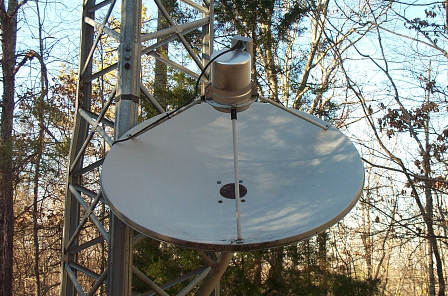
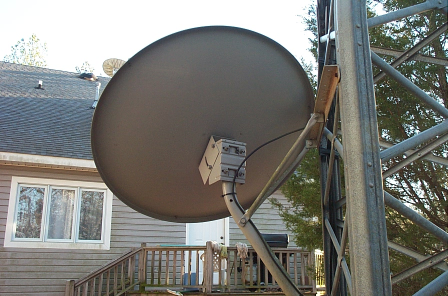
NoaaPort Installation
Here are some pictures of my NoaaPort installation. The pictures show a 10 foot dish that I picked up for free. I am using a Norsat 8515 500 Khz. 15° Professional LNB with a Chaparral feedhorn. The receiver is a Novra S75.
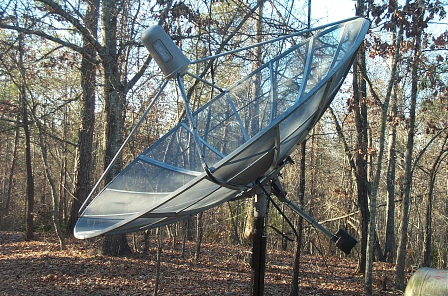
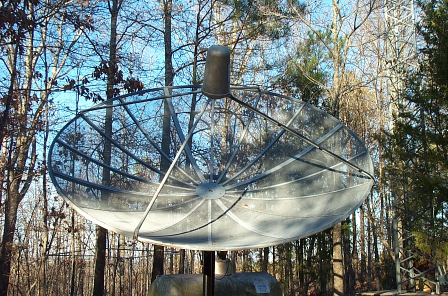
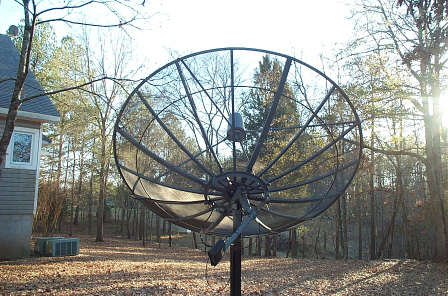
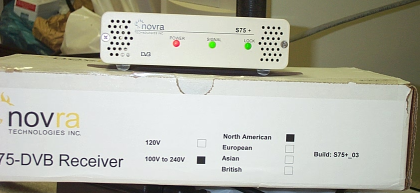
Saturday, January 26, 2008
WxPort
I have made several changes to WxPort, the NoaaPort ingest program. It can now ingest all 4 NWS datastreams. I have also identified several problems that have not been discovered by other users.
I have a test program that will decode the gini data (satellite images). I will be refining it further.
I will try to post some images of my installation tomorrow.
I have a test program that will decode the gini data (satellite images). I will be refining it further.
I will try to post some images of my installation tomorrow.
Monday, January 21, 2008
Weather Message Beta 5
I am in the process of uploading Weather Message Beta 5. I am also refreshing all of the other applications. No big changes - check the release notes for the details.
NoaaPort
I have been interested in the NoaaPort data stream since I wrote WxPort. I decided to go ahead and build a NoaaPort system.
I spent the last couple of days installing a used 10 foot dish. After the dish was installed and aligned, I connected my new Novra S75 DVB-S receiver. I am now receiving all 4 NoaaPort channels. I can tell you there there is more data than anyone could possibly review.
I will be reviewing the image and radar data to see how I can use it for future upgrades to Weather Message and WxPort.
I spent the last couple of days installing a used 10 foot dish. After the dish was installed and aligned, I connected my new Novra S75 DVB-S receiver. I am now receiving all 4 NoaaPort channels. I can tell you there there is more data than anyone could possibly review.
I will be reviewing the image and radar data to see how I can use it for future upgrades to Weather Message and WxPort.
Monday, December 31, 2007
2007 Year End Comments
It is hard to believe that Weather Message is now six years old. For an application that started out as a paging add-in for other EMWIN applications, it has turned into so much more. I credit the success of Weather Message to you the end users. Your suggestions and ideas have driven my development efforts.
I spent all of 2006 rewriting the Weather Message applications. Users started testing version 3.0 at the end of 2006. It was officially released in March 2007. Versions 3.1 and 3.2 were released this year with a number of major enhancements.
I am still working down my list of change requests. The list has gotten smaller, but there is still alot of work to be completed. Look for more of these in version 3.3.
I thank you for your continued support. My hope for you, your families and the agencies and communities you serve is a great and prosperous New Year.
I spent all of 2006 rewriting the Weather Message applications. Users started testing version 3.0 at the end of 2006. It was officially released in March 2007. Versions 3.1 and 3.2 were released this year with a number of major enhancements.
I am still working down my list of change requests. The list has gotten smaller, but there is still alot of work to be completed. Look for more of these in version 3.3.
I thank you for your continued support. My hope for you, your families and the agencies and communities you serve is a great and prosperous New Year.
Monday, December 24, 2007
December Note
December has been a busy month for me personally. I have been extremely busy with my "day job". New responsibilities and other concerns have required my full attention.
With a couple of days off for the holidays, I will be making some additional changes. Look for them sometime Christmas evening. I am off now to make my rounds and visit family.
Merry Christmas to all.
With a couple of days off for the holidays, I will be making some additional changes. Look for them sometime Christmas evening. I am off now to make my rounds and visit family.
Merry Christmas to all.
Sunday, December 02, 2007
Windows Vista - UAC
Windows Vista's new UAC (User Account Control) may be redirecting the registry and c:\program files\wxmesgnet access to a virtual directory. I have not received a problem report yet, but it would cause an issue if two different users log into the same computer. They would have independent program settings.
The rerouting of the registry and program files directory is a result of virtualization by the UAC changes for 32 bit applications. Microsoft no longer allows standard users to access c:\program files\(application name) any longer. They has have removed the ability to access HKey_LocalMachine\Software for standard users.
Basically Microsoft does not want developers to store application configuration data in c:\program files\(application name) any longer. The same goes for the registry location HKey_LocalMachine\Software.
Virtulization occurs for applications that do not have an embedded manifest. An embedded manifest identifies the type of access that the application needs. The manifest can request administrator access or invoker access. At the present time Weather Message does not contain an embedded manifest.
With the new VS2008 development environment, I can easily embed the manifest. I am concerned that turning on the manifest will result in users losing their existing settings. I will be testing this further before enabling the manifest.
The rerouting of the registry and program files directory is a result of virtualization by the UAC changes for 32 bit applications. Microsoft no longer allows standard users to access c:\program files\(application name) any longer. They has have removed the ability to access HKey_LocalMachine\Software for standard users.
Basically Microsoft does not want developers to store application configuration data in c:\program files\(application name) any longer. The same goes for the registry location HKey_LocalMachine\Software.
Virtulization occurs for applications that do not have an embedded manifest. An embedded manifest identifies the type of access that the application needs. The manifest can request administrator access or invoker access. At the present time Weather Message does not contain an embedded manifest.
With the new VS2008 development environment, I can easily embed the manifest. I am concerned that turning on the manifest will result in users losing their existing settings. I will be testing this further before enabling the manifest.
Sunday, November 25, 2007
Weather Message 3.3 Beta 2 Released
I just posted Weather Message 3.3 Beta 2 on the web. The two big changes are the way that passwords are handled and the addition of multiple state selection. If you run into any issues, please let me know.
Saturday, November 24, 2007
Weather Message Beta 3.3 beta 2
I will be releasing Weather Message 3.3 Beta 2 over the weekend. Here are some of the changes.
1) WxLoader has several new options that effect the short message format. This closes a number of user requests.
2) Weather Message Setup will now allow users to select multiple states for one alarm. This request has been outstanding for some time.
These changes were quite involved and took alot of time.
1) WxLoader has several new options that effect the short message format. This closes a number of user requests.
2) Weather Message Setup will now allow users to select multiple states for one alarm. This request has been outstanding for some time.
These changes were quite involved and took alot of time.
.Net Framework 3.5 - No support for Windows 2000
The Microsoft .Net Framework version 3.5 does not contain support for Windows 2000. It appears that Microsoft is dropping support for that operating system as they release their new technologies. I already knew that version 3.0 did not include Windows 2000. I had hoped it would be included in 3.5. They are supporting XP, Vista, and Windows 2003.
This makes it difficult on the developers that want to take advantage of the features. The Microsoft developers have given me the ability to support the 2.0 framework using their new development environment. That is a big plus. This allows me to take advantage of the new productivity features.
This however does mean that support for Windows 2000 will end in the near future. It looks like Microsoft's decision is to get developers to encourage their users to purchase their newer operating systems.
I have a windows 2000 laptop that works great. I hate to discard it, but as some one famous said "time waits for no man". I guess I will have to get something newer also.
This makes it difficult on the developers that want to take advantage of the features. The Microsoft developers have given me the ability to support the 2.0 framework using their new development environment. That is a big plus. This allows me to take advantage of the new productivity features.
This however does mean that support for Windows 2000 will end in the near future. It looks like Microsoft's decision is to get developers to encourage their users to purchase their newer operating systems.
I have a windows 2000 laptop that works great. I hate to discard it, but as some one famous said "time waits for no man". I guess I will have to get something newer also.
Wednesday, November 21, 2007
Visual Studio 2008 - Framework 3.5
On Monday, Microsoft announced the release of Visual Studio 2008 along with the Microsoft .Net framework version 3.5. I currently use Visual Studio 2005 as my development environment.
Microsoft says that the move to 2008 should be relatively simple from a developers perspective. The original move from Visual Studio 6 was a year long project. I have read that I should not have to make any changes in the software to take advantage of the new developement environment.
I am looking for the DVD to arrive soon. When it arrives I will be testing this new environment and framework for Weather Message. If everything looks good, I will release the next version using the new environment. This will require users to download and install the 3.5 framework. It should be available from windows update soon --- if you want to get a head start.
Microsoft says that the move to 2008 should be relatively simple from a developers perspective. The original move from Visual Studio 6 was a year long project. I have read that I should not have to make any changes in the software to take advantage of the new developement environment.
I am looking for the DVD to arrive soon. When it arrives I will be testing this new environment and framework for Weather Message. If everything looks good, I will release the next version using the new environment. This will require users to download and install the 3.5 framework. It should be available from windows update soon --- if you want to get a head start.
Passwords
I have had a number of discussions with users about password security. The next Weather Message beta will contain changes that address these concerns. The passwords that are stored in the setup files and registry will now be obfuscated. Obfuscated basically means that they are not stored in clear text and cannot be read.
I tried to change all of the screens that show passwords so that they will mask the password. If I missed any, please let me know.
The ftp debug file will no longer show a clear text password. If you see any in other debug files, please let me know.
I tried to change all of the screens that show passwords so that they will mask the password. If I missed any, please let me know.
The ftp debug file will no longer show a clear text password. If you see any in other debug files, please let me know.
Saturday, November 03, 2007
Files now stored with UTC time suffix
Starting with version 3.3, Weather Message will be storing files in the WxText and WxGraph directories with the UTC time instead of local time. This change will prevent problems when the time changes between standard and daylight savings.
I am still testing these changes. Several programs had to be changed to know that the time is stored as UTC.
I am still testing these changes. Several programs had to be changed to know that the time is stored as UTC.
TCV Product Change from C coding to Z coding
The Tropical Cyclone Watch/Warning (TCV) product is now being issued using zone (Z) encoding. Weather Message version 2.10, 3.0, 3.1 and 3.2 lists this product as FIPS or county (C) coded.
In order to properly alarm this product, the Weather Message versions listed above need to be reconfigured. To manually reconfigure Weather Message, edit the "WxCtype.dat" file in the c:\program files\WxMesg or c:\program files\WxMesgNet directory. Remove the line that contains TCV.
You can optionally download an updated WxCtype.dat file from the Weather Message additional downloads page at http://www.wxmesg.com/misdownloads.htm. Scroll down to Updated FIPS product file. If you have alarms setup for TCV, you will need to double check them. After this change you will need to reselect "All Counties" or the individual counties based on your requirements.
Apparently when the product moved from experimental to operational, the NWS decided to change the UGC coding.
In order to properly alarm this product, the Weather Message versions listed above need to be reconfigured. To manually reconfigure Weather Message, edit the "WxCtype.dat" file in the c:\program files\WxMesg or c:\program files\WxMesgNet directory. Remove the line that contains TCV.
You can optionally download an updated WxCtype.dat file from the Weather Message additional downloads page at http://www.wxmesg.com/misdownloads.htm. Scroll down to Updated FIPS product file. If you have alarms setup for TCV, you will need to double check them. After this change you will need to reselect "All Counties" or the individual counties based on your requirements.
Apparently when the product moved from experimental to operational, the NWS decided to change the UGC coding.
Tuesday, October 23, 2007
Geographical Warnings
Tom and I have been discussing Geographical Warnings. These are warnings based on your location. Weather Message now has the capability to send emails and pages based on a fixed latitude / longitude falling inside or near a polygon.
A really neat application would be to have your gps equipped phone know when it is getting near or inside a watch or warning. Is that possible? Yes and it is not too difficult.
It would require one of two approaches.
1) Run an application on the smartphone that would send the current gps position to a weather server. The server would then search the active watch and warning products to see if the position is near or inside one of the watch and warnings. The application would then alert the user. I am thinking that it would have to send that position once per minute.
2) Run an application on the smartphone that would receive a SMS/email message that contains the polygon information. The application would then check the current position against the polygon and issue an alert. The information would only need to be sent once. It would be the applications responsibility to keep the active watch / warnings in memory and check once per minute to see if the phone was in a warned area.
With smart devices (phones and pda's) this application could work. Some major players in technology have been talking about this for sometime. They even want to put this in cars...
So can it be done on a Weather Message budget? I believe a low cost server solution is possible. All it would take is a user that wants this capability, a phone that supports Windows Mobile and a calling plan that allowed for unlimited SMS or reasonable internet access.
A really neat application would be to have your gps equipped phone know when it is getting near or inside a watch or warning. Is that possible? Yes and it is not too difficult.
It would require one of two approaches.
1) Run an application on the smartphone that would send the current gps position to a weather server. The server would then search the active watch and warning products to see if the position is near or inside one of the watch and warnings. The application would then alert the user. I am thinking that it would have to send that position once per minute.
2) Run an application on the smartphone that would receive a SMS/email message that contains the polygon information. The application would then check the current position against the polygon and issue an alert. The information would only need to be sent once. It would be the applications responsibility to keep the active watch / warnings in memory and check once per minute to see if the phone was in a warned area.
With smart devices (phones and pda's) this application could work. Some major players in technology have been talking about this for sometime. They even want to put this in cars...
So can it be done on a Weather Message budget? I believe a low cost server solution is possible. All it would take is a user that wants this capability, a phone that supports Windows Mobile and a calling plan that allowed for unlimited SMS or reasonable internet access.
WxPda - Version 3.0 - Beta 2
I had a chance today to install WxPda on a Pocket Pc 2003 computer. I quickly discovered that there was a problem with vga screens. I have corrected that problem and uploaded a fresh beta.
Monday, October 22, 2007
WxPda - Version 3.0
I have upgraded WxPda to Microsoft's Compact Framework 2.0. This upgrade also adds support for Windows Mobile 5. I am changing the program version to 3.0 to match the current Weather Message Net major release number.
I have run some very limited tests. I do not know if it will install on Pocket PC 2003 or Smart Phones. If you give it a try, please let me know your results.
I switched the display on my windows mobile 5 device to landscape and the software now looks correct. You can now use landscape on a windows mobile 5 without problems.
I have run some very limited tests. I do not know if it will install on Pocket PC 2003 or Smart Phones. If you give it a try, please let me know your results.
I switched the display on my windows mobile 5 device to landscape and the software now looks correct. You can now use landscape on a windows mobile 5 without problems.
Sunday, October 14, 2007
Weather Message 3.2 Released
Weather Message V3.2 has been released. You can download the update at
http://www.wxmesg.com/downloadsnet.htm . For information on what has changed in this release, please read the release notes.
http://www.wxmesg.com/downloadsnet.htm . For information on what has changed in this release, please read the release notes.
There are over 56 changes in this release. Here are some highlights.
Highlights -
* Weather Message Server can now run as a Windows service.
* Support for storm based warnings. You can now alarm by latitude longitude.
* WxMap now supports painting polygons.
* WxMap has all colors located in one tab. You can now select the items that appear in the map legend.
* WxMap supports the NWS Zone and Marine layers. To use this feature you must download the latest map layers.
* See the release notes for a complete list of changes.
Thanks for all of your suggestions, bug reports and assistance with the software. Work will begin on version 3.3.
Suggestions for 3.3
- Multiple state support in one alarm.
- User manager.
WxDataSave, WxLocal and the Retransmission applications have been respectively released along with Weather Message 3.2. If you are using any of these applications, they must be upgraded at the same time you upgrade Weather Message.
Birmingham NWS Weather School
I will be making a one hour presentation on EMWIN and Weather Message at the Birmingham NWS's Weather School October 16, 2007. The Birmingham NWS is a long time supporter of EMWIN.
They have incorporated information about EMWIN into their annual Weather School. Because of this, they will not be holding an EMWIN workshop this year. If you are interested in attending an EMWIN workshop, I suggest you contact your local WCM and ask them to sponsor a class.
They have incorporated information about EMWIN into their annual Weather School. Because of this, they will not be holding an EMWIN workshop this year. If you are interested in attending an EMWIN workshop, I suggest you contact your local WCM and ask them to sponsor a class.
Sunday, October 07, 2007
Weather Message 3.2 Beta 9
I am getting prepared to upload Weather Message 3.2 Beta 9. I have made a number of internal changes in the programs. I discovered that all of the programs contained some code associated with creating windows that was not needed.
This extra code was a result of the original conversion. I knew it was there, but did not realize the magnitude it had on the application. After removing the extra code from Weather Message Server Setup, the size of the "exe" was reduced by 30,000 bytes. I made the same changes in all of the applications - about 10 hours worth of work. This should help all of the programs load little faster and reduce the size of the installed application.
I have added a third option map layer to WxMap. This layer can be user defined or populated with the new rivers layer. I will be updating the map layers download to include an option rivers layer.
If the test reports on this beta are favorable, I will look at releasing beta 9 as the offical 3.2 release.
Look for the update later this evening.
This extra code was a result of the original conversion. I knew it was there, but did not realize the magnitude it had on the application. After removing the extra code from Weather Message Server Setup, the size of the "exe" was reduced by 30,000 bytes. I made the same changes in all of the applications - about 10 hours worth of work. This should help all of the programs load little faster and reduce the size of the installed application.
I have added a third option map layer to WxMap. This layer can be user defined or populated with the new rivers layer. I will be updating the map layers download to include an option rivers layer.
If the test reports on this beta are favorable, I will look at releasing beta 9 as the offical 3.2 release.
Look for the update later this evening.
Monday, October 01, 2007
Weather Message Webserver Crash
The computer that contains the Weather Message website crashed this afternoon. The website is hosted on the computer that contains several other websites. I have been working to get this computer back working all afternoon and into the late night.
I am in the process of updating the website with the latest content. I hope it is back to normal by noon Tuesday.
I am in the process of updating the website with the latest content. I hope it is back to normal by noon Tuesday.
Update 10/2/2007 - I believe the webserver is back to normal operation now....
Monday, September 17, 2007
WxMap - Polygon Styles
After much discussion with one of my beta testers, I have renamed one of the polygon styles and added an additional style.
The Outline style has been renamed Area. Area paints the double lines around the warned area. The new style is named Outline. This style paints only an outline in the color of the alarm. It causes the program to not paint the county. Here are a couple of examples.
 The image above shows an example of a severe thunderstorm and flash flood warning with no other watches or warnings active.
 This image shows a severe thunderstorm along with a thunderstorm watch.
The Outline style has been renamed Area. Area paints the double lines around the warned area. The new style is named Outline. This style paints only an outline in the color of the alarm. It causes the program to not paint the county. Here are a couple of examples.
 The image above shows an example of a severe thunderstorm and flash flood warning with no other watches or warnings active.
 This image shows a severe thunderstorm along with a thunderstorm watch.
Sunday, September 16, 2007
Blogging - One year has passed
I started this blog one year ago. It is hard to believe that one year has passed by so quickly. I did not think that I would be able to find items to post when I got started. I spend alot of time working on Weather Message, so I was not sure if I could keep the blog updated.
To the number of people that follow my development progress here -- thanks for taking the time to read this blog. This blog has received 5,793 hits since it was first started. Not alot, but then again, EMWIN and Weather Message are well kept secrets. Hopefully not for long - please keep spreading the word.
To the number of people that follow my development progress here -- thanks for taking the time to read this blog. This blog has received 5,793 hits since it was first started. Not alot, but then again, EMWIN and Weather Message are well kept secrets. Hopefully not for long - please keep spreading the word.
WxMap Polygons Release
I should be releasing a new beta this evening that contains the polygon changes to WxMap. Here is a preview of the two styles of polygons supported in WxMap.

This style is called pattern. The pattern is the color associated with the alarm color.

This style is called outline. The polygon is painted with an outline that is the color associated with the alarm color.

This style is called pattern. The pattern is the color associated with the alarm color.

This style is called outline. The polygon is painted with an outline that is the color associated with the alarm color.
Sunday, September 09, 2007
WxMap - Polygon Support
I have started changing WxMap to support storm based polygons. Here is snap shot of some polygons drawn on the map. There will need to be a number of options added to determine how they are drawn.


Sunday, September 02, 2007
WxControl - Service Controller
Based on user requests I have made a couple of changes relating to WxControl.
1) The program now be setup to connect to two different servers. It will only connect to one at a time.
2) The Weather Message full install will have an option to only install WxControl. For those that want to only install WxControl, this option will meet that requirement.
---
From the initial reports that I have received, WxControl works great on a local network. It however does not work across an Internet connection. Due to the mechanism used, I have not been able to resolve this issue. More testing should reveal the nature of the problem.
1) The program now be setup to connect to two different servers. It will only connect to one at a time.
2) The Weather Message full install will have an option to only install WxControl. For those that want to only install WxControl, this option will meet that requirement.
---
From the initial reports that I have received, WxControl works great on a local network. It however does not work across an Internet connection. Due to the mechanism used, I have not been able to resolve this issue. More testing should reveal the nature of the problem.
Friday, August 31, 2007
Weather Radio Recall
On August 29, the U.S. Consumer Product Safety Commission (CPSC), in cooperation with Oregon Scientifc, announced a voluntary recall of four models of Oregon Scientific Weather Radios. Details are provided on the CPSC Website
Sunday, August 12, 2007
WxControl - Remote Operation
If you are wanting to run WxControl remotely and cannot get it to connect to Weather Message Server, the following information may be helpful.
1) If you get an error 5 Access Denied, you have a security / authentication problem. See if you can create the same user name and password on both computers. The next Weather Message beta will reduce the security requirements for the server. That may also address the problem.
2) Windows XP SP2 and Windows Server 2003's firewall may disable remote access to named pipes. Try opening port 445. Here is a Microsoft article that discusses SQL Server, but the information applies to opening port 445. http://support.microsoft.com/kb/839269
3) See if named pipe security has been enabled - http://support.microsoft.com/kb/925890
If you have to use one of these means to obtain access, let me know what you did and I will see about automating the procedure.
Danny
1) If you get an error 5 Access Denied, you have a security / authentication problem. See if you can create the same user name and password on both computers. The next Weather Message beta will reduce the security requirements for the server. That may also address the problem.
2) Windows XP SP2 and Windows Server 2003's firewall may disable remote access to named pipes. Try opening port 445. Here is a Microsoft article that discusses SQL Server, but the information applies to opening port 445. http://support.microsoft.com/kb/839269
3) See if named pipe security has been enabled - http://support.microsoft.com/kb/925890
If you have to use one of these means to obtain access, let me know what you did and I will see about automating the procedure.
Danny
Sunday, August 05, 2007
Service Controller now available
I have completed the initial work on the Weather Message Server Service Controller. This application will allow you to monitor Weather Message Server when it is running as a service. It will also allow you to monitor a remote Weather Message Server even if it is not running as a service. I am sure there will be requests for refinements, however, it fulfills the basic need to monitor the server.
This gets another request off my list that has been there for some time. Version 3.2 contains a number of good enhancements that have required quite some time to implement. After some clean up work, I will be making other changes.
This gets another request off my list that has been there for some time. Version 3.2 contains a number of good enhancements that have required quite some time to implement. After some clean up work, I will be making other changes.
Sunday, July 29, 2007
Service Controller
Since releasing a version of Weather Message that runs as a service, several customers have asked what happened to the user interface. Well when an application runs as a service, most of the time you lose the user interface because the application is running in the background. Most software packages provide another application that can be used to monitor the background service.
I have spent the last week studying interprocess communications. I have decided to use named pipes since they appear to be quite efficient. Named pipes are basically memory files that can be shared across process boundaries. I need a way for a 'controller' application to talk to the server and get the screen updates. Named pipes should do this well.
The 2.0 framework does not have built-in support for named pipes, so it was necessary to write all of the code to communciate with named pipes. Support for named pipes will be in the Microsoft 3.5 Framework. That Framework however will not work on Windows 2000 computers. The 3.0 Framework does support a mechanism that I could have used, it also does not support Windows 2000.
I completed the routines today and the tests look good. I should be able to create the WxController application sometime this week. It will be a small application. The big change will be updating Weather Message Server so that it will send data to the connected controller application.
One good point is that named pipes can be used across a network. So it will be possible to run WxController on a remote computer to monitor the server. I will say that this is only recommended on fast networks. If the primary goal was to monitor remotely, then using tcp/ip sockets would be a better approach.
I have spent the last week studying interprocess communications. I have decided to use named pipes since they appear to be quite efficient. Named pipes are basically memory files that can be shared across process boundaries. I need a way for a 'controller' application to talk to the server and get the screen updates. Named pipes should do this well.
The 2.0 framework does not have built-in support for named pipes, so it was necessary to write all of the code to communciate with named pipes. Support for named pipes will be in the Microsoft 3.5 Framework. That Framework however will not work on Windows 2000 computers. The 3.0 Framework does support a mechanism that I could have used, it also does not support Windows 2000.
I completed the routines today and the tests look good. I should be able to create the WxController application sometime this week. It will be a small application. The big change will be updating Weather Message Server so that it will send data to the connected controller application.
One good point is that named pipes can be used across a network. So it will be possible to run WxController on a remote computer to monitor the server. I will say that this is only recommended on fast networks. If the primary goal was to monitor remotely, then using tcp/ip sockets would be a better approach.
Monday, July 23, 2007
Fire Zones
I have taken the time to add fire zones to the County_Z.dat file. These zones are used for fire weather products. After adding the zones, I have mixed emotions about including it in the regular distribution.
There are some duplicate county names that may confuse users that do not know the difference between the forecast and fire zones. I added "FZ" before the names so that I could tell the difference.
I will include County_FZ_Z.dat with my normal distribution. If someone wants the fire zones, they can simply replace the stock County_Z.dat with County_FZ_Z.dat.
Note: Fire Zones are generally used in the Northwestern states.
There are some duplicate county names that may confuse users that do not know the difference between the forecast and fire zones. I added "FZ" before the names so that I could tell the difference.
I will include County_FZ_Z.dat with my normal distribution. If someone wants the fire zones, they can simply replace the stock County_Z.dat with County_FZ_Z.dat.
Note: Fire Zones are generally used in the Northwestern states.
Sunday, July 22, 2007
Weather Message Server - Service Support
Weather Message Server now has an option to run as a Windows Service. There have been a number of requests for this ability.
The current version of Weather Message requires you to login before Weather Message will be started. The ability to run as a Windows Service alleviates the need to login. As soon as the computer boots, Weather Message will be started.
I still have a number of tests to run, but my initial tests have been successful. There are some additional enhancements that need to be made. Basically an interface needs to be written that will communicate with the Weather Message Server service.
The current version of Weather Message requires you to login before Weather Message will be started. The ability to run as a Windows Service alleviates the need to login. As soon as the computer boots, Weather Message will be started.
I still have a number of tests to run, but my initial tests have been successful. There are some additional enhancements that need to be made. Basically an interface needs to be written that will communicate with the Weather Message Server service.
Saturday, July 21, 2007
SSL Support for SMTP Instructions
I have posted a document on the Miscellaneous downloads page that describes the steps necessary to setup Weather Message for a secure smtp connection. The example I used is for gmail.
Here is the direct link Secure SMTP Setup
Here is the direct link Secure SMTP Setup
Changes in file access routines
I have changed the file access routines, that read or write products, to use file streams. File streams are more efficient than the commands that were previously used. Changing the file access routines was the last thing pending from the original software conversion from 2 to 3.
While changing these routines, I discovered that WxByte and WxIngest were creating the tracking file twice when the first block of a product was received. I eliminited one of those. That will reduce the number of writes to the harddrive.
I also made changes in Weather Message server that will reduce the number of times that it accesses a new product. It was checking the size of the file, then reading the file. This has now been incorporated into one file access.
Although the programs seem to run efficiently like they are now, these changes will make them more efficient and ready for the faster data stream.
While changing these routines, I discovered that WxByte and WxIngest were creating the tracking file twice when the first block of a product was received. I eliminited one of those. That will reduce the number of writes to the harddrive.
I also made changes in Weather Message server that will reduce the number of times that it accesses a new product. It was checking the size of the file, then reading the file. This has now been incorporated into one file access.
Although the programs seem to run efficiently like they are now, these changes will make them more efficient and ready for the faster data stream.
Friday, July 13, 2007
SSL Support with 3rd Party Application
Several users have expressed a desire to have SSL/TLS support for SMTP in Weather Message. The cost of this upgrade from my tcp/ip vendor has been too costly for the small number of users needing this capability.
After alot of research, I discovered a free application that will create a secure tunnel to the smtp server. Stunnel is a universal SSL wrapper. I have tested it tonight with my ISP and it works fine. I also tested it with gmail with success. I will publish setup information on the WxMesg group about this application.
You will find information on Stunnel at http://www.stunnel.org/
After alot of research, I discovered a free application that will create a secure tunnel to the smtp server. Stunnel is a universal SSL wrapper. I have tested it tonight with my ISP and it works fine. I also tested it with gmail with success. I will publish setup information on the WxMesg group about this application.
You will find information on Stunnel at http://www.stunnel.org/
Sunday, July 08, 2007
Polygons on WxMap

I am experimenting with placing polygons on WxMap. One of the problems is dealing with the color of the polygon?
This picture is not very clear, but the polygon is green. In WxMap is it clear and distinct.
Weather Message Version 3.2 Beta 1 Released
I am in the process of uploading Weather Message Version 3.2 beta 1 to the website.
If you will be using the new polygon alarm, I would recommend that you set it up as a second alarm and leave your original alarm. It should be tested before replacing your original alarm.
If you will be using the new zone and marine layers, you will need to download the new layers. See the release notes.
If you will be using the new polygon alarm, I would recommend that you set it up as a second alarm and leave your original alarm. It should be tested before replacing your original alarm.
If you will be using the new zone and marine layers, you will need to download the new layers. See the release notes.
Saturday, July 07, 2007
County and Marine Zones added to WxMap
WxMap now supports the County Zone and Marine Zone layers. This has been a feature requested for some time.
County zones, in some cases, are different from the County Fips area. The Fips area represents the actual county outline. The Zones area may be for part of a county or extend into multiple counties.
The Marine zones cover the coastal waters and the Great Lakes.
County zones, in some cases, are different from the County Fips area. The Fips area represents the actual county outline. The Zones area may be for part of a county or extend into multiple counties.
The Marine zones cover the coastal waters and the Great Lakes.
Friday, July 06, 2007
Polygon Alarms Completed
I have completed the changes to enable polygon alarms. You can now enter a latitude, longitude and radius for each alarm. The software will require the incoming message to have LAT...LON information.
If the message has this information, the software will determine if your latitude and longitude are inside the polygon. If not, it will then get the distance your latitude and longitude are from the nearest edge of the polygon. If it is within the radius you specified, the alarm will trip.
This feature will require careful testing. It will also require users to have a good understanding of polygon warnings. This capability requires that the incoming messages be properly coded.
If the message has this information, the software will determine if your latitude and longitude are inside the polygon. If not, it will then get the distance your latitude and longitude are from the nearest edge of the polygon. If it is within the radius you specified, the alarm will trip.
This feature will require careful testing. It will also require users to have a good understanding of polygon warnings. This capability requires that the incoming messages be properly coded.
Polygon Alarms - What is my latitude / longitude
As I have moved forward with polygon alarms, I needed a method to get the latitude / longitude for an address. As it turns out there are several public sources for this information. They however do not allow integration with an application without paying a monthly cost.
Due to those restrictions, I created a public webpage that will allow users to get their latitude and longitude. I selected Google Maps for the provider. The webpage can be accessed from the Weather Message home page or directly at http://www.wxmesg.com/geomap/wxgeomap.htm
I will try to put a link in the setup program to take users to this webpage.
Due to those restrictions, I created a public webpage that will allow users to get their latitude and longitude. I selected Google Maps for the provider. The webpage can be accessed from the Weather Message home page or directly at http://www.wxmesg.com/geomap/wxgeomap.htm
I will try to put a link in the setup program to take users to this webpage.
Thursday, July 05, 2007
Map Layers
I am in the process of integrating the NWS Zone and Marine layers into WxMap. My initial tests have been promissing. They do require some additional memory due to the size of the layers. I should be working on the internal processing logic over the next couple of days. I hope there will be a beta by the weekend.
I have updated the Weather Message .Net download page with the latest map files. The install includes two new options: Map Base - County Zones and Map Base - Marine. These will have to be installed before any of the new zone changes will work. If you install all of the layers, you will install approximately 54 megabytes of map data.
I have updated the Weather Message .Net download page with the latest map files. The install includes two new options: Map Base - County Zones and Map Base - Marine. These will have to be installed before any of the new zone changes will work. If you install all of the layers, you will install approximately 54 megabytes of map data.
Wednesday, July 04, 2007
Polygon Status
I have completed the code necessary to determine if a point is inside a polygon. Also the code necessary to determine the distance in miles of a point in relation to a polygon.
This paves the way to start changes that will allow for an alarm based on a latitude / longitude. This was some involved code.
This paves the way to start changes that will allow for an alarm based on a latitude / longitude. This was some involved code.
Saturday, June 23, 2007
Polygon Warnings
All of the responses regarding polygon warnings have been favorable. I have ordered a book on computational geometry to help with the changes. Adding the option to test for a point or distance of a point from a polygon sounds easy in concept, but difficult in practice.
I will be looking at adding this ability after further research and study.
I will be looking at adding this ability after further research and study.
Map Changes - Combined Product List
I have completed changes that now centralize all products in one list. There are no longer two lists, one for the 8 main products and another for "Other Colors". This allows users the flexibility to arrange products to fit their needs and area.
 The screen still allows you to add products by typing in the grid. For new users, the Add Product button will allow you to select the vtec combination, color and legend option.
This capability completes a set of involved changes that have been going on for the past 3 versions.
Sunday, June 17, 2007
Polygon Warnings Discussion
I started a thread on the Weather Message Yahoo group about Polygon Warnings and Weather Message. I am seeking input from users on whether the software should allow you to enter a latitude and longitude as part of the alarm.
If anyone is interested, please join the group and make a comment.
http://tech.groups.yahoo.com/group/wxmesg/
If anyone is interested, please join the group and make a comment.
http://tech.groups.yahoo.com/group/wxmesg/
Weather Message 3.1 released
Weather Message 3.1 has been released. There are over 70 changes in this release and a number of new features. From the reports that I have received from beta testers, this release is stable.
This release gets us back on track with quarterly updates to Weather Message.
I should start this afternoon preparing the software for a version 3.2 beta.
This release gets us back on track with quarterly updates to Weather Message.
I should start this afternoon preparing the software for a version 3.2 beta.
Sunday, June 10, 2007
Version 3.1 Beta B
Due to the number of changes that I made to the programs and installer for the new user selectable 'Auto Startup' option. I decided to go ahead and release a beta so that I could test it on a couple of computers at my office on Monday.
If all goes well, I will go ahead publish the official release.
If all goes well, I will go ahead publish the official release.
Saturday, June 09, 2007
Auto Startup Options
After being prompted by a user, I made changes to the programs and installers so that a user can easily change the Windows startup options for each program. I have been thinking about this change for sometime.
The next update will automatically remove existing startup shortcuts from the "Startup" folder and move them to the registry. Each program can then easily change the "startup" option. You will find the option "Auto Startup". The valid entries are "No", "Yes" for the current user, or "Everyone" for all users.
The next update will automatically remove existing startup shortcuts from the "Startup" folder and move them to the registry. Each program can then easily change the "startup" option. You will find the option "Auto Startup". The valid entries are "No", "Yes" for the current user, or "Everyone" for all users.
Sunday, June 03, 2007
LAT...LON decoding
I have completed the LAT...LON decoding logic for Weather Message. The decoder will be included in the next beta. At the present time it simply decodes these items. They will be used in different ways in the 3.2 release.
Saturday, June 02, 2007
Testing Alarms
I have added the ability to test alarms by right clicking on an alarm and selecting "Test Alarm". This feature works well when the product does not have alot of wild cards. It will not work for user defined product prefixes or products that have wild cards.
This should help alot of users with testing alarms. Especially alarms that generate emails or pages.
This should help alot of users with testing alarms. Especially alarms that generate emails or pages.
Monday, May 28, 2007
Weather Message 3.1 Beta 9 Released
I have uploaded Weather Message 3.1 Beta 9. We are reaching the final changes for the 3.1 release. Due to some errors found in the 3.0 release, I have been pushing forward to release version 3.1.
I have a number of pending changes that I am looking at now. I may hold them so that 3.1 can be released and make them available in the 3.2 beta.
I have a number of pending changes that I am looking at now. I may hold them so that 3.1 can be released and make them available in the 3.2 beta.
Sunday, May 27, 2007
Changes to consider
I have been running over my list of changes to catch up some old items. In the process I have thought of a couple of items that I want to note to check on as time permits.
1. Add the ability to test the smtp settings from the email setup options window.
2. Add the ability to create a test message from the main setup screen. Right click on an alarm and select "Test Alarm" or "Send Test".
3. What about having a test option on the email, page, and fax group page. Right click on a group and select "Send Test Message". (This could probably be accomplished with item 2)
4. Consider disabling the state and county boxes when the product is not coded as having UGC. The same for VTEC. (There are warning messages now.)
From a support position, I believe items 1 and 2 need to be completed. Some users have difficulty getting their email server information setup properly. A test option would let them know if they have that part correct.
Item 2 would be a big help with "knowing that it works". It however would basically require me to rewrite WxMesgText in the setup program.
1. Add the ability to test the smtp settings from the email setup options window.
2. Add the ability to create a test message from the main setup screen. Right click on an alarm and select "Test Alarm" or "Send Test".
3. What about having a test option on the email, page, and fax group page. Right click on a group and select "Send Test Message". (This could probably be accomplished with item 2)
4. Consider disabling the state and county boxes when the product is not coded as having UGC. The same for VTEC. (There are warning messages now.)
From a support position, I believe items 1 and 2 need to be completed. Some users have difficulty getting their email server information setup properly. A test option would let them know if they have that part correct.
Item 2 would be a big help with "knowing that it works". It however would basically require me to rewrite WxMesgText in the setup program.
Sunday, May 20, 2007
Retry ability added to the paging subsystem
The Email subsystem has had a retry mechanism for some time. The Paging subsystem now has this capabililty. The paging services setup screen now allows you to specify the number of retries and minutes between retries.
Both options are available for http-get, http-post, snpp and wctp. The number of retries is available for TAP. Neither option is available for pagegate.
The Fax subsystem has always had support for retries. The number of retries are currently hardcoded in the software.
Both options are available for http-get, http-post, snpp and wctp. The number of retries is available for TAP. Neither option is available for pagegate.
The Fax subsystem has always had support for retries. The number of retries are currently hardcoded in the software.
Saturday, May 19, 2007
ByteBlaster Server Beta Changes
I have been studying changes to the ByteBlaster Server to make it more efficient. We know that the EMWIN data stream will be moving from 9600 baud to 19200 baud in the near future. Due to this change the bandwidth required to run a ByteBlaster server will double.
With that thought in mind, I have implemented changes in the ByteBlaster Server code to compress the data block and make it variable length. My initial tests for a 20 minute period indicates a 30% decrease in packet size. This test period included a number of graphic products that do not compress.
I will be testing this server code on my production system. I will release a beta version of Weather Message that incorporates these changes in WxByte. If the tests are successful, I will publish a paper on the protocol changes.
With that thought in mind, I have implemented changes in the ByteBlaster Server code to compress the data block and make it variable length. My initial tests for a 20 minute period indicates a 30% decrease in packet size. This test period included a number of graphic products that do not compress.
I will be testing this server code on my production system. I will release a beta version of Weather Message that incorporates these changes in WxByte. If the tests are successful, I will publish a paper on the protocol changes.
Sunday, May 06, 2007
Scripting
I have been working with one user to write some scripts in WxScheduler. I have to admit that this feature is nice. It allows for a degree of flexibility that could not be implemented in the base application. I really want to seriously look at adding plugin capability to weather message server. This could provide some additional capabilities with short messages and archiving.
Map Changes
I have started making some changes to WxMap. The color information for the legend items and other colors has now been consolidated in the same area of the ini file. This change allowed for some optimization in the code.
The other color products now have the option "legend". If you check this item, the product is added to the legend on the main window.
I have added a label counties option to the map menu. This option will try to label counties depending on the zoom level. The program attempts to fit the county name inside the county. Right now the program requires 60 pixels of space to show the county name. Zooming in will show more of the names. I may need to add an option to allow users to set the minimum pixel size.
I have found that if you enable this option while there are active alarms, it may take a little while for the program to label the active counties. The same goes for disabling the alarms. I will find out why the mapping program does that. The name is displayed with a yellow background to help make it stand out. This also may require a user setting.
The next change for the map involves optimization. Right now when a new product is received, the program redraws all of the active weather. This takes a considerable amount of CPU time. This change will be involved. I will see if I can get that started today. This issue must be resolved before adding other capabilities.
The other color products now have the option "legend". If you check this item, the product is added to the legend on the main window.
I have added a label counties option to the map menu. This option will try to label counties depending on the zoom level. The program attempts to fit the county name inside the county. Right now the program requires 60 pixels of space to show the county name. Zooming in will show more of the names. I may need to add an option to allow users to set the minimum pixel size.
I have found that if you enable this option while there are active alarms, it may take a little while for the program to label the active counties. The same goes for disabling the alarms. I will find out why the mapping program does that. The name is displayed with a yellow background to help make it stand out. This also may require a user setting.
The next change for the map involves optimization. Right now when a new product is received, the program redraws all of the active weather. This takes a considerable amount of CPU time. This change will be involved. I will see if I can get that started today. This issue must be resolved before adding other capabilities.
Thursday, April 26, 2007
Radar Server Problems?
I ran WxRadar this more to take a looking a the weather coming to my area. Everything looked normal. This afternoon I received an email from a user saying that WxRadar was broke. I tried running WxRadar on my computer and it failed also.
It turns out that there is some problem with the radar server. It almost looks like they have discontinued the radar on that server. A quick check through the nws site found that the radar was working. After some digging I found that they were pulling radar from another location http://origin-radar.weather.gov
There is a registry key that can be created to use this server. I sent that information to the few users that asked about it this afternoon. I have sent emails to several NWS addresses to see what is happening.
It turns out that there is some problem with the radar server. It almost looks like they have discontinued the radar on that server. A quick check through the nws site found that the radar was working. After some digging I found that they were pulling radar from another location http://origin-radar.weather.gov
There is a registry key that can be created to use this server. I sent that information to the few users that asked about it this afternoon. I have sent emails to several NWS addresses to see what is happening.
WxScheduler - Script Support
I am completing the changes that will allow users use vb.net scripts in WxScheduler. The software will pass the received data to the script and you can then modify the data and pass it back to WxScheduler.
The scripts must conform to the syntax in vb.net 2005. WxScheduler compiles the scripts before running them, allowing them to be more efficient.
I am sure there will be some questions about this capability after it is released.
The scripts must conform to the syntax in vb.net 2005. WxScheduler compiles the scripts before running them, allowing them to be more efficient.
I am sure there will be some questions about this capability after it is released.
Sunday, April 01, 2007
Windows Vista Desktop Problem
I have had a user report that their desktop was not updating properly after running for serveral days. Apparently this is a problem with Vista. The user supplied me with this link from Microsoft - http://support.microsoft.com/kb/932406/en-us
ProFTPD
I am working with a couple of users to resolve a problem with ProFTPD. When you use the No Overwrite option, there is a 2 minute delay in sending the file to the ftp server. I have a work around available now.
It appears that this ftp server returns a 450 status code instead of 550. I have sent an email to my ftp vendor about this problem. Hopefully I will know more next week.
It appears that this ftp server returns a 450 status code instead of 550. I have sent an email to my ftp vendor about this problem. Hopefully I will know more next week.
Version 3.1 Beta
I have release a version 3.1 beta to correct a couple of problems identified with the 3.0 release. I am trying to update the 3.1 beta with corrections on Sundays. Check for updates on Sunday evenings.
Depending on the reports that I receive over the next couple of weeks, I may go ahead and release 3.1. There were a couple of problems that could be issues for new users.
Depending on the reports that I receive over the next couple of weeks, I may go ahead and release 3.1. There were a couple of problems that could be issues for new users.
Sunday, March 04, 2007
Version 3.0 - Released
I am in the process of releasing version 3.0. Some links may not work initially. It will take me some time to get the website completely updated. As soon as I complete the website changes, I will post a series of notes about 3.0 on the yahoo group.
Sunday, February 25, 2007
Version 3.0 Beta J
A group of issues were reported last week. Due to those reports, a new beta has been uploaded to the website. I hope these will be the last reports before the final release.
There is an issue with saving the map image as a TIF. I have been communicating with my map component vendor and they are working on that issue.
There is an issue with saving the map image as a TIF. I have been communicating with my map component vendor and they are working on that issue.
Saturday, February 17, 2007
Final 3.0 Changes?
I am uploading an updated beta based on the feed back that I have received this week. There were a couple of things that did not work, or caused problems.
I hope this is the last upload before release.
I hope this is the last upload before release.
Friday, February 16, 2007
VTEC Alarms to the Map and WxLoader
It appears that all VTEC lines are being set to WxMap and WxLoader even went you enter specific VTEC alarms. I have confirmed this issue and will get changes made for the 3.0 release.
Sunday, February 11, 2007
Weather Message 3.0 Beta H Uploaded
I have uploaded Weather Message 3.0 Beta H. This should be the last beta unless a problem is reported.
I still have a good deal of work to do on the website in preparation for this update. Watch for further news later this week.
I still have a good deal of work to do on the website in preparation for this update. Watch for further news later this week.
Note to Version 3.0 Test Users
If you are testing or using version 3.0 and have any pending issues, please get them to me as soon as possible. I am getting prepared to relase version 3.0.
Note to All Users: I will be releasing information on the yahoo group about version 3.0 soon.
Note to All Users: I will be releasing information on the yahoo group about version 3.0 soon.
Tuesday, February 06, 2007
Weather Message 3.0 Beta G Refreshed
I have refreshed Weather Message Net 3.0 Beta G with the latest tcp/ip dll's. I hope this is the final major component needed for 3.0. I will begin production testing on Wednesday and watch this for a couple of days. If all goes well, I will begin the process to release 3.0. (I was beginning to think this day would not come.)
If you are a beta tester, please give this version a try. Exercise the parts of the program that use tcp/ip; email, ftp, and client connections.
If you are a beta tester, please give this version a try. Exercise the parts of the program that use tcp/ip; email, ftp, and client connections.
Weather Message 3.0 Update
Weather Message 3.0 should be released soon. I have been waiting on a fix for the tcp/ip control. This change arrived today. I will get the binaries updated tonight and refresh the beta on the website.
I will get this version install on my production system and allow it to run for a couple of days. If everything looks good, I will start getting everything prepared for the release.
I will get this version install on my production system and allow it to run for a couple of days. If everything looks good, I will start getting everything prepared for the release.
Saturday, February 03, 2007
More Configuration Files Move to XML
Some of the Weather Message programs already use xml configuration files. Two weeks ago, WxLoader moved to xml. This weekend WxScheduler was changed to xml.
While I am waiting on some tcp/ip changes, I am trying to get as many, if not all of the configuration files in this format. Using xml allows me to easily add new features without having to worry about writing conversion programs between releases.
This however does create a problem for beta testers. They have had to reenter some of their information during the beta period. The full install will convert exising 2.x versions to the new 3.0 formats.
I can convert beta tester's files should that be needed.
While I am waiting on some tcp/ip changes, I am trying to get as many, if not all of the configuration files in this format. Using xml allows me to easily add new features without having to worry about writing conversion programs between releases.
This however does create a problem for beta testers. They have had to reenter some of their information during the beta period. The full install will convert exising 2.x versions to the new 3.0 formats.
I can convert beta tester's files should that be needed.
Memory Upgrade
If you want to breath some new life into your computer, consider a memory upgrade. I purchased a new development computer, for Weather Message, two years ago. I ordered it with 1gb of memory. Moving from a computer with 512mb to 1gb made a big difference.
At any given time, I have a number of programs running, including Weather Message. A couple of copies of the development environment, Word, and Weather Message consume more memory than you think. I recently added an additional 1gb of memory for 2 gb total. Although the computer does not seem like it is alot faster, the hard drive activity has dropped considerably. This is a result of the operating system not having to swap programs out to the hard drive's paging file.
As you are working, bring up the task manager and click on performance. Watch the PF Usage. This shows how much of the hard drive's paging file that is being used. Hard drive paging file access is slow.
Systems that are running low on memory have a high paging file usage. This results in alot of hard drive access when programs start. If there is not enough memory, inactive programs are moved from physical ram to the paging file on the hard drive to make room for active programs.
The next time you think your system is running slow, take a look at the Task Manager and see if you need a memory upgrade.
At any given time, I have a number of programs running, including Weather Message. A couple of copies of the development environment, Word, and Weather Message consume more memory than you think. I recently added an additional 1gb of memory for 2 gb total. Although the computer does not seem like it is alot faster, the hard drive activity has dropped considerably. This is a result of the operating system not having to swap programs out to the hard drive's paging file.
As you are working, bring up the task manager and click on performance. Watch the PF Usage. This shows how much of the hard drive's paging file that is being used. Hard drive paging file access is slow.
Systems that are running low on memory have a high paging file usage. This results in alot of hard drive access when programs start. If there is not enough memory, inactive programs are moved from physical ram to the paging file on the hard drive to make room for active programs.
The next time you think your system is running slow, take a look at the Task Manager and see if you need a memory upgrade.
Web Server Upgrade
The Weather Message web server has had a number of upgrades in the past six months. The first upgrade moved the computer from a 2.8 Pentium 4 to a 3.4 ghz Pentium D. This past week, the original hard drive started to fail. The ide drive was replaced with two SATA2 drives in a RAID 1 configuration.
There have been several outages as this latest upgrade was implemented. There will be a couple of outages next week when the other drives are upgraded. This web server is running Windows 2003 Server Standard and hosts the Weather Message website along with my Weather Message production software. It has a full T1 connection to the internet.
The company that I work for allows me to host the Weather Message website on this server. It services their website along with the website for my volunteer fire department. This is a great benefit from my "day job".
In addition to developing Weather Message, I have to keep up the Weather Message website in my spare time. When I started this endeavor, I never thought that there was so much work involved. Sometimes it seems like I spend more time doing administrative jobs than working on the software.
There have been several outages as this latest upgrade was implemented. There will be a couple of outages next week when the other drives are upgraded. This web server is running Windows 2003 Server Standard and hosts the Weather Message website along with my Weather Message production software. It has a full T1 connection to the internet.
The company that I work for allows me to host the Weather Message website on this server. It services their website along with the website for my volunteer fire department. This is a great benefit from my "day job".
In addition to developing Weather Message, I have to keep up the Weather Message website in my spare time. When I started this endeavor, I never thought that there was so much work involved. Sometimes it seems like I spend more time doing administrative jobs than working on the software.
Tuesday, January 23, 2007
WxLoader
While I have been waiting for the TCP/IP fix from my vendor I have been busy with changes to WxLoader. WxLoader has been completely reworked. This application now connects to the Weather Message Server using tcp/ip and no longer needs a processing directory. This eliminates the need for setting up alarms to archive products to a WxLoader directory.
It connects as a map client and can process any message sent to the map. There are a number of changes to this application. I hope to release a beta version by the weekend. It does require you to change the "files name" to "awips" identifers. This is caused by the fact that it no longer processes files.
It connects as a map client and can process any message sent to the map. There are a number of changes to this application. I hope to release a beta version by the weekend. It does require you to change the "files name" to "awips" identifers. This is caused by the fact that it no longer processes files.
Saturday, January 06, 2007
Purging
A problem was identified with the new purging capability. If you used the number of products option, the program would not purge December products when January products arrived. I uploaded the fix to the website.
Monday, December 25, 2006
Emwin Software Defined Receiver
Changes have been made to WxByte to allow it to connect to the Emwin Software Defined Receiver's demodulator TCP/IP output data stream. This eliminates the need to use two serial ports.
Saturday, December 23, 2006
Status - Update
I still have two pending issues that need to be resolved before version 3.0 can be released. I have a strange tcp/ip problem in Weather Message Server and Byte Blaster Server. The problem occurs with the internal tcp/ip buffer fills. This causes the applications to hang until the offending client disconnects.
The tcp/ip vendor sent me a correction, however, it appears to still have this problem under different circumstances. I have sent another email to them regarding this problem.
A couple of users have reported a strange GDI+ error with WxIngest. I have temporarily removed the sliding data window to see if this resolves the issue.
As soon as these two issues are addressed, I'll go ahead and release 3.0.
I am going to try and release 2.10 as the public release for Weather Message Classic. There have been several changes over the year and it needs to be version that new users are downloading.
The tcp/ip vendor sent me a correction, however, it appears to still have this problem under different circumstances. I have sent another email to them regarding this problem.
A couple of users have reported a strange GDI+ error with WxIngest. I have temporarily removed the sliding data window to see if this resolves the issue.
As soon as these two issues are addressed, I'll go ahead and release 3.0.
I am going to try and release 2.10 as the public release for Weather Message Classic. There have been several changes over the year and it needs to be version that new users are downloading.
Friday, December 15, 2006
Status
This has been a busy week for me. I have had meetings every night. I will catch up my email replies tonight.
Weather Message 3.0 Beta C has been running on my production server all week. I saw one problem that I am trying to address with my tcp/ip vendor. Other than that, I think we are about ready for a software release. I will do some more clean up this weekend and start getting the website for the software release.
Thanks to all who have helped with the beta version.
Weather Message 3.0 Beta C has been running on my production server all week. I saw one problem that I am trying to address with my tcp/ip vendor. Other than that, I think we are about ready for a software release. I will do some more clean up this weekend and start getting the website for the software release.
Thanks to all who have helped with the beta version.
Sunday, December 10, 2006
ByteBlaster Server Notes
I number of changes have been made to the 3.0 ByteBlaster Server. It now requires that clients send a verification packet once. The original byteblaster server required that clients send a verification packet once every 12 minutes. There is no need for that requirement and it has now been dropped.
I have noticed a number of unusual disconnects in the byteblaster server log. After alot of research and some changes, I have found that some clients are not sending an identification / verification packet. If no verification packet is received, the server will disconnect the client after 12 minutes.
The verification packet should be sent right after connection and once every 12 minutes. The format of this packet is:
ByteBlast Client|NM-email@server.com|V1
Replace email@server.com with the appropriate email address. The verification packet should be Xor'd with hex FF before sending.
I have noticed a number of unusual disconnects in the byteblaster server log. After alot of research and some changes, I have found that some clients are not sending an identification / verification packet. If no verification packet is received, the server will disconnect the client after 12 minutes.
The verification packet should be sent right after connection and once every 12 minutes. The format of this packet is:
ByteBlast Client|NM-email@server.com|V1
Replace email@server.com with the appropriate email address. The verification packet should be Xor'd with hex FF before sending.
TCP/IP Server Component Update
I did discover a bug in my tcp/ip vendor's component. I had to send them a sample application to prove the problem. They got me a fix on Friday and I got it installed in all of the programs Friday night. I am still testing the changes.
Sunday, December 03, 2006
TCP/IP Server Component Issue
I have been watching the new 3.0 Byte Blaster Server run for a week. I suspected that something was not exactly right. The question was it a me problem or something else. After 5 hours or research, I believe that I found a problem with my TCP/IP Vendor's IP Component.
When the buffer completely fills, the component should tell me that it is full so that I can disconnect the client or perform other tasks. It appears that is just waits for the buffer to empty, which is not correct. I am not sure if this is a problem in their latest release or if it has been there all along.
I have sent an email asking about this issue. They don't respond to emails on the weekends, so I will have to wait until Monday for a reply.
This effects Weather Message Server and the ByteBlaster Server software. It is not a big issue for Weather Message Server, was we always want to send data to the clients. For the ByteBlaster Server, we want to disconnect clients that have full buffers.
I will most likely go ahead and post a beta tonight. When a solution to the buffer full problem is identified, I'll refresh the beta.
When the buffer completely fills, the component should tell me that it is full so that I can disconnect the client or perform other tasks. It appears that is just waits for the buffer to empty, which is not correct. I am not sure if this is a problem in their latest release or if it has been there all along.
I have sent an email asking about this issue. They don't respond to emails on the weekends, so I will have to wait until Monday for a reply.
This effects Weather Message Server and the ByteBlaster Server software. It is not a big issue for Weather Message Server, was we always want to send data to the clients. For the ByteBlaster Server, we want to disconnect clients that have full buffers.
I will most likely go ahead and post a beta tonight. When a solution to the buffer full problem is identified, I'll refresh the beta.
Received Block Monitor

I have been reading about graphics and GDI+. GDI+ is the new graphics drawing include in the .Net 2.0 framework. This sparked my interest in creating a simple block monitor for the Serial and Internet ingest engines. Here is a picture of the block monitor.
Each block represents a 1024 byte packet for the incoming file. Green blocks show good packets, yellow for packets not received and red for bad packets.
You can activate this monitor by clicking on the Green Led to the right of the file name. For WxByte, you click on the file name to the right of the Connect button.
Thursday, November 30, 2006
Monitor Monitor Please Wake Up
A user asked me about waking up a sleeping monitor when an alert arrives for the Message and Map Clients. I had never thought about that. When my computer plays a sound and my monitor is sleeping, I just reach over and move the mouse to see what was issued by the NWS.
Changes have been made in the 3.0 clients to support this feature. If the Message Client plays a sound, a command will be issued to wake up the monitor. If the Map Client pops up, it will issue a command to wake up the monitor.
Changes have been made in the 3.0 clients to support this feature. If the Message Client plays a sound, a command will be issued to wake up the monitor. If the Map Client pops up, it will issue a command to wake up the monitor.
Sunday, November 26, 2006
Weather Message Net Beta 10
I have posted Beta 10 to the website http://www.wxmesg.com/wxbeta
This update includes changes for Weather Message, Weather Message Clients, WxLocal and WxDataSave.
I will try to post a 2.10 release with the updated map component tomorrow.
This update includes changes for Weather Message, Weather Message Clients, WxLocal and WxDataSave.
I will try to post a 2.10 release with the updated map component tomorrow.
USB to Serial Adapters
Not all USB to Serial Adapters are created equal. When I upgraded my computer several years ago, I purchased an IOGear GUC232A. It worked with my Zephyrus receiver, however, every once in a while, the serial port would simply lock up. When this occurred, I had to reboot my computer to get the serial port back working. If I stopped and stop the serial ingest program rapidly, the port would lock up.
I picked up a new MFJ USB to Serial Adapter recently and installed it over the weekend. I have not had a lock up with it yet. The MFJ unit is based on the FTDI chip set.
I picked up a new MFJ USB to Serial Adapter recently and installed it over the weekend. I have not had a lock up with it yet. The MFJ unit is based on the FTDI chip set.
Saturday, November 25, 2006
Short Message by Product Update
The next beta will contain the ability to specify short messages by product. The Short Message menu option has been replaced with Product Specifications.
You can enter TOR to enter a short message to be used by the TOR product. You can also enter TORBMX to have a short message for a specific WFO.
The program will honor the short message setup for a group first, then look for a matching product. If neither are present, it will used the default message.
This has been a commonly requested feature. Due to the amount of work required, it has remained on the pending features list for some time.
You can enter TOR to enter a short message to be used by the TOR product. You can also enter TORBMX to have a short message for a specific WFO.
The program will honor the short message setup for a group first, then look for a matching product. If neither are present, it will used the default message.
This has been a commonly requested feature. Due to the amount of work required, it has remained on the pending features list for some time.
Thursday, November 23, 2006
Colors
As several people have discovered, the version 3.0 software uses a new color scheme. The new colors have 4 components A, R, G and B. A is the alpha channel (transparency), R for red, G for green and B for blue.
I have been asked about convering html colors to a decimal value. Note: You will probably want to use the windows calculator to convert hex values to decimal. Here is an example.
Alice Blue's html color is #F0F8FF hex or 15792383 decimal. In order to convert this color so that is usable in the WxMap ini file, you need to do the following. Take 15792383 and add 4278190080, which is the alpha channel value (#FF000000), then subtract 4294967296 (#100000000). This results in the value -984833. This value can be used in the WxMap.ini file.
Note: The alpha channel's value 255 (#FF) represents no transparency.
The proper representation of this value in hex is FF,F0,F8,FF. This is the ARGB format.
You can convert one component at a time as follows.
FF = 255 * 16777216 = 4278190080
F0 = 240 * 65536 = 15728640
F8 = 248 * 256 = 63488
FF = 255 * 1 = 255
Value = 4293982463
Subtract 4294967296
ARGB = -984833
You can convert from ARGB to the individual componets. It is important to remember that if the number is negative, you first need to add 4294967296 (#100000000). Once this addition has occurred, you can plug that decimal number into the windows calculator and click the Hex button to get each hexadecimal pair.
Note: In windows calculator, click view, then select scientific. This gives you the hex to decimal and decimal to hex conversion options.
I have been asked about convering html colors to a decimal value. Note: You will probably want to use the windows calculator to convert hex values to decimal. Here is an example.
Alice Blue's html color is #F0F8FF hex or 15792383 decimal. In order to convert this color so that is usable in the WxMap ini file, you need to do the following. Take 15792383 and add 4278190080, which is the alpha channel value (#FF000000), then subtract 4294967296 (#100000000). This results in the value -984833. This value can be used in the WxMap.ini file.
Note: The alpha channel's value 255 (#FF) represents no transparency.
The proper representation of this value in hex is FF,F0,F8,FF. This is the ARGB format.
You can convert one component at a time as follows.
FF = 255 * 16777216 = 4278190080
F0 = 240 * 65536 = 15728640
F8 = 248 * 256 = 63488
FF = 255 * 1 = 255
Value = 4293982463
Subtract 4294967296
ARGB = -984833
You can convert from ARGB to the individual componets. It is important to remember that if the number is negative, you first need to add 4294967296 (#100000000). Once this addition has occurred, you can plug that decimal number into the windows calculator and click the Hex button to get each hexadecimal pair.
Note: In windows calculator, click view, then select scientific. This gives you the hex to decimal and decimal to hex conversion options.
Wednesday, November 22, 2006
Weather Message Production Server Conversion
The Weather Message Production Server was upgraded to Weather Message .Net 3.0 today. The conversion worked, however, I did identify a couple of problems that I will fix for the next beta.
I will be watching the server carefully over the next couple of days to make sure the conversion was clean.
- The map ini file did not fully convert.
- There seems to be some problem with TAP paging using a 300 baud modem.
- WxDataSave is reporting a problem with graphic products.
- Some of the WxLoader files did not fully convert.
Overall I am pleased and it appears that my server is using less cpu. The old WxDataSave really took alot of cpu.Update 11/22/06 22:15 - These problems are now resolved.
I will be watching the server carefully over the next couple of days to make sure the conversion was clean.
Sunday, November 19, 2006
Weather Message Net Beta 9
I have posted Beta 9 to the website http://www.wxmesg.com/wxbeta
This update includes changes for Weather Message, Weather Message Clients, WxLocal and WxDataSave.
I went ahead and uploaded it early due to changes needed by some users. I have a couple of additional changes, but they are going to take a little more time to get completed.
Hopefully I will have some productive time over the holidays to get several changes completed.
This is getting us close to releasing 3.0. Since all of the programs have been completed, I will be upgrading my production system - hopefully this week. After it runs for while, I should be ready.
This update includes changes for Weather Message, Weather Message Clients, WxLocal and WxDataSave.
I went ahead and uploaded it early due to changes needed by some users. I have a couple of additional changes, but they are going to take a little more time to get completed.
Hopefully I will have some productive time over the holidays to get several changes completed.
This is getting us close to releasing 3.0. Since all of the programs have been completed, I will be upgrading my production system - hopefully this week. After it runs for while, I should be ready.
Saturday, November 18, 2006
Short Message by Product
I am looking into the ability to specify a different short message by product identifier. I have had a number of request for this capability.
The thought is to replace the current short message menu option with "Product Specification" or "Product Specs". The user would be presented with a list, that would contain a default entry that would apply to all products. Clicking on the default row would allow you to change the current short message info. Adding a new product would allow you to setup a new short message, vtec message, options for that product. This would allow you to have a different "user defined" option for each product.
If this proceeds forward, I am questioning whether there needs to be a short message option on the group.
The program would use the group short message first, if present. Then check for a matching product short message, if one was not found, it would use the default.
The thought is to replace the current short message menu option with "Product Specification" or "Product Specs". The user would be presented with a list, that would contain a default entry that would apply to all products. Clicking on the default row would allow you to change the current short message info. Adding a new product would allow you to setup a new short message, vtec message, options for that product. This would allow you to have a different "user defined" option for each product.
If this proceeds forward, I am questioning whether there needs to be a short message option on the group.
The program would use the group short message first, if present. Then check for a matching product short message, if one was not found, it would use the default.
Radar Image Update
WxRadar now supports the following national products:
National Mosaic
Pacific Northwest Sector
Northern Rockies Sector
Upper Mississippi Valley Sector
Central Great Lakes Sector
Northeast Sector
Southeast Sector
South Mississippi Valley Sector
Southern Plains Sector
Southern Rockies Sector
Pacific Southwest Sector
You must select the state "NA" to see these radar sites.
National Mosaic
Pacific Northwest Sector
Northern Rockies Sector
Upper Mississippi Valley Sector
Central Great Lakes Sector
Northeast Sector
Southeast Sector
South Mississippi Valley Sector
Southern Plains Sector
Southern Rockies Sector
Pacific Southwest Sector
You must select the state "NA" to see these radar sites.
WxDataSave
I have posted the install program for WxDataSave .Net. This is the database archive utility.
Sunday, November 12, 2006
Weather Message Net Beta 8
I have uploaded Beta 8 to the website. This update contains a couple of fixes and updated F1 documentation for all programs.
I also realized that I had not created an install for WxLocal. It can now be downloaded from http://www.wxmesg.com/WxBetaNet/LoBetaNet.htm The install includes integrated documentation.
I will work to get the installer for WxDataSave created this week, along with the associated documentation. I had over looked it also.
The documentation conversion project is coming to a close. I will get everything read and checked for errors. That will allow me to concentrate on changes and additional testing prior to 3.0 release. The documentation had to be completed before the software could be released.
I knew the documentation conversion would take alot of time, but I did not realize how much work had to be done. The old documenation was around 150 pages. The new documentation is around 190.
I also realized that I had not created an install for WxLocal. It can now be downloaded from http://www.wxmesg.com/WxBetaNet/LoBetaNet.htm The install includes integrated documentation.
I will work to get the installer for WxDataSave created this week, along with the associated documentation. I had over looked it also.
The documentation conversion project is coming to a close. I will get everything read and checked for errors. That will allow me to concentrate on changes and additional testing prior to 3.0 release. The documentation had to be completed before the software could be released.
I knew the documentation conversion would take alot of time, but I did not realize how much work had to be done. The old documenation was around 150 pages. The new documentation is around 190.
Saturday, November 04, 2006
HVTEC Progress
Changes have been made to Weather Message to support HVTEC alarms. The alarm setup screen follows. 
I have not worked out the details on how the short message variables will work. Stay tuned.
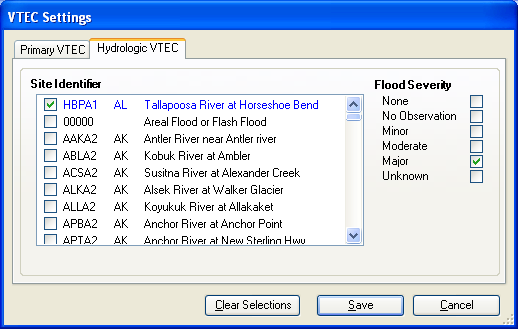
I have not worked out the details on how the short message variables will work. Stay tuned.
Thursday, November 02, 2006
Group2Call - Adding Pauses in the Message
You can add pauses to the Group2Call text to speech messages by adding this text:
<SILENCE MSEC="500"/>
This will cause the text to speech engine to pause for 500 milliseconds.
<SILENCE MSEC="500"/>
This will cause the text to speech engine to pause for 500 milliseconds.
Subscribe to:
Posts (Atom)